

HYXN H2 ARGB
4.4/ 5
Dual-chamber ATX layout
8 PWM ARGB fans
420mm radiator support
Type-C 3.2 front I/O
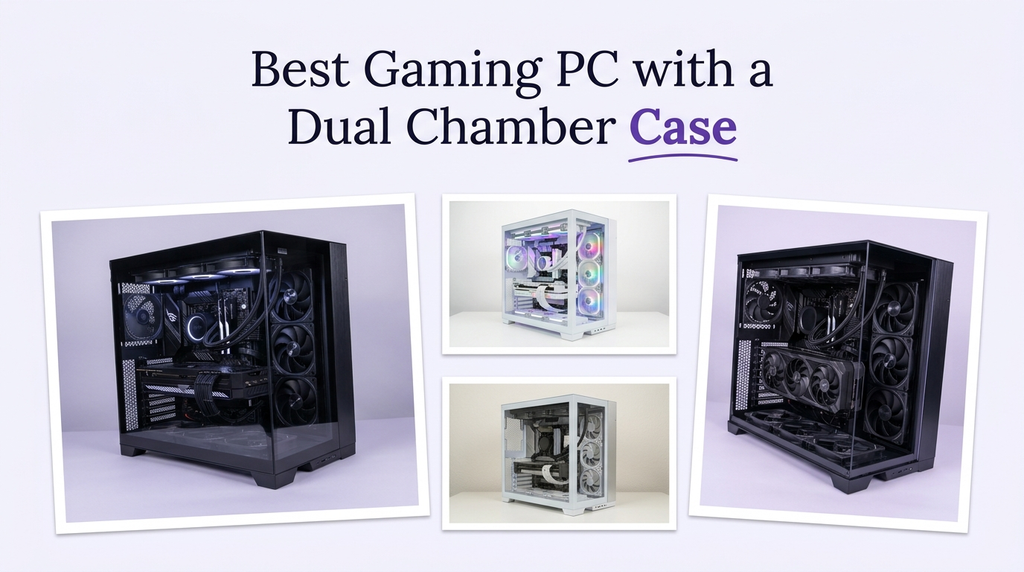
A dual-chamber case separates the main components from the power supply and drives, creating two distinct zones inside the chassis. That layout can improve airflow, simplify cable management, and make a build look cleaner through a tempered-glass panel. For a gaming PC, it can also mean better thermal performance and more room for large radiators and graphics cards, though the extra size and cost are real trade-offs.
The dual-chamber approach is popular in high-end builds because it hides the power supply and cable clutter behind a partition, leaving the main chamber focused on the motherboard, GPU, and cooling. The result is often a more polished look and a clearer path for airflow. However, not every dual-chamber case is the same. Radiator support, fan capacity, GPU clearance, and cable-routing space vary widely, and the case alone does not determine performance.
To build this guide, we compared the listed specifications and customer ratings across all ten cases and chassis options. We weighed chamber layout, airflow design, pre-installed fans, radiator support, GPU and cooler clearance, cable management, front I/O, and overall build quality. We also considered how each option fits different gaming builds rather than ranking by price alone. The recommendations reflect specification-based reasoning, not measured test results.
4.4/ 5

4.7/ 5

4.7/ 5
As an Amazon Associate we earn from qualifying purchases, at no additional cost to you.
Swipe across to compare all columns
| Product | Key highlights | Rating | Explore |
|---|---|---|---|
|
Best value
HYXN H2 ARGB
|
Dual-chamber ATX layout
8 PWM ARGB fans
420mm radiator support
Type-C 3.2 front
|
4.4/ 5 | Check Price |
|
Best overall
HYTE Y70 Touch Infinite
|
Dual-chamber ATX chassis
14.9-inch touchscreen
10 fan capacity
PCIe 4.0 riser
|
4.7/ 5 | Check Price |

Best white touchscreen option
HYTE Y70 Touch Infinite White
|
Dual-chamber ATX chassis
14.9-inch touchscreen
10 fan capacity
PCIe 4.0 riser
|
4.7/ 5 | Check Price |

Best value
HYXN H2 No ARGB
|
Dual-chamber ATX layout
8 non-LED fans
420mm radiator support
Type-C 3.2 front
|
4.5/ 5 | Check Price |
|
Premium pick
NZXT H9 Flow RGB+
|
Dual-chamber ATX design
Two F420 RGB fans
420mm radiator support
Back-connect ready
|
4.7/ 5 | Check Price |

Best compact dual-chamber
STRUXVEX S6
|
Micro-ATX dual-chamber
3 pre-installed fans
360mm AIO support
400mm GPU clearance
|
4.6/ 5 | Check Price |

Best value
KEDIERS K4
|
Dual-chamber ATX
8 PWM ARGB fans
420mm radiator support
USB-C Gen 2
|
4.6/ 5 | Check Price |
Best wood-trim design
Asiahorse SCUTUM
|
Dual-chamber ATX
Ash wood trim
360mm radiator support
20Gbps USB-C
|
4.5/ 5 | Check Price |

Best mainstream dual-chamber
ASUS A32 Plus
|
Dual-chamber ATX
Four ARGB fans
360mm radiator support
USB-C 10Gbps
|
4.5/ 5 | Check Price |

Best value
HYXN H1
|
Dual-chamber ATX
7 PWM ARGB fans
Dual 360mm support
Type-C front I/O
|
4.5/ 5 | Check Price |
As an Amazon Associate we earn from qualifying purchases, at no additional cost to you.
The HYXN H2 ARGB is the Best value pick because it delivers a dual-chamber layout, eight pre-installed PWM ARGB fans, and 420mm radiator support at a relatively low price. It is aimed at builders who want a showcase case with strong airflow and lighting without spending a lot.
The dual-chamber design separates the power supply and drives from the main components, which helps with cable management and airflow. The eight included fans provide immediate cooling and lighting, so you do not need to buy extra fans for a basic build. The case supports large radiators, including dual-layer configurations, and GPUs up to 455mm.
The case supports E-ATX, ATX, M-ATX, and ITX motherboards, along with back-mounted motherboard designs. The front I/O includes Type-C 3.2, USB 3.0, USB 2.0, and audio. The extra-large rear compartment and built-in Velcro straps help with cable routing.
The main trade-offs are the large footprint and the care needed when handling tempered glass. If you want a dual-chamber case with included fans and radiator support at a low price, this is a strong starting point.
Eight pre-installed PWM ARGB fans save the cost and effort of buying and installing fans separately. They also provide an immediate airflow path and lighting for a new build.
Builders who want a smaller case should compare the STRUXVEX S6. Anyone who wants an integrated touchscreen should consider the HYTE Y70 Touch Infinite.
As an Amazon Associate we earn from qualifying purchases, at no additional cost to you.
The HYTE Y70 Touch Infinite is the Best overall pick because it combines a dual-chamber ATX layout with a 14.9-inch 2.5K touchscreen, a panoramic glass design, and extensive cooling capacity. It is aimed at builders who want a showcase PC with a unique display and strong hardware support.
The dual-chamber interior separates the power supply and drives from the main components, and the panoramic glass panels provide a clear view. The integrated touchscreen supports 10-point multi-touch and customization through HYTE Nexus software. The case includes a PCIe 4.0 riser cable for vertical graphics card mounting.
Cooling capacity is a strong point: the case supports up to a 360mm radiator on the side and an adjustable top radiator, plus floor cooling for additional fans, for up to 10 fans total. The four-slot vertical graphics layout supports large cards.
The main trade-offs are the premium price and the added complexity of the touchscreen. If you want a dual-chamber showcase case with a unique display and strong cooling capacity, this is the top choice.
The 14.9-inch 2.5K touchscreen can display system information, custom images, or interactive widgets through HYTE Nexus software. It is a distinctive feature that adds functionality and visual interest to a build.
Builders who want a simpler case should compare the NZXT H9 Flow RGB+. Anyone who wants a lower price should consider the HYXN H2.
As an Amazon Associate we earn from qualifying purchases, at no additional cost to you.
The HYTE Y70 Touch Infinite in Snow White offers the same dual-chamber layout, 14.9-inch 2.5K touchscreen, and extensive cooling capacity as the Pitch Black version, but in a white colorway. It is aimed at builders who want a bright, showcase-style PC.
The dual-chamber interior separates the power supply and drives from the main components, and the panoramic glass panels provide a clear view. The touchscreen supports customization through HYTE Nexus software, and the included PCIe 4.0 riser cable supports vertical graphics card mounting.
Cooling capacity supports up to a 360mm side radiator and an adjustable top radiator, plus floor cooling, for up to 10 fans total. The four-slot vertical graphics layout supports large cards.
The main trade-offs are the premium price and the fact that a white finish may show dust more readily. If you want a white dual-chamber showcase with a touchscreen, this is the matching option.
White cases can show dust more easily than black ones. Regular cleaning of the glass panels and fan filters helps maintain the look.
Builders who prefer a black case should choose the Pitch Black version. Anyone who wants a lower price should consider the HYXN H2.
As an Amazon Associate we earn from qualifying purchases, at no additional cost to you.
The HYXN H2 No ARGB is the non-RGB version of the H2 dual-chamber case, offering the same layout and eight pre-installed fans without LED lighting. It is aimed at builders who want a clean, understated build or plan to add their own lighting.
The dual-chamber design separates the power supply and drives from the main components, and the eight included fans provide airflow. The case supports 420mm radiators and GPUs up to 455mm, along with E-ATX, ATX, M-ATX, and ITX motherboards.
The front I/O includes Type-C 3.2, USB 3.0, USB 2.0, and audio. The extra-large rear compartment and Velcro straps help with cable routing. The main trade-off is the lack of included RGB lighting.
This case makes sense for a builder who wants dual-chamber airflow and radiator support without paying for RGB fans. If you want lighting included, the ARGB version is the alternative.
A non-RGB build can look clean and understated, and it avoids the extra cabling and software associated with RGB lighting. It is a good choice for a professional-looking setup.
Builders who want included RGB lighting should choose the ARGB version. Anyone who wants a smaller case should compare the STRUXVEX S6.
As an Amazon Associate we earn from qualifying purchases, at no additional cost to you.
The NZXT H9 Flow RGB+ is the Premium pick because it combines a dual-chamber layout with optimized airflow, two F420 RGB Core fans, and support for 420mm radiators. It is aimed at builders who want a high-end, airflow-focused showcase case.
The dual-chamber design separates the power supply and drives from the main components. Perforated steel panels and angled front-right fans support airflow. The case includes two F420 RGB Core fans, one F120 RGB Core fan in the rear, and an NZXT Control Hub.
The case supports up to nine 140mm fans across the top, front-right, and bottom, plus one 120mm fan in the rear. It fits up to a 420mm radiator on the top and front-right, with clearance for high-end graphics cards. Back-connect support allows a cable-free look with compatible motherboards.
The main trade-offs are the premium price and the large footprint. If you want a premium dual-chamber case with strong airflow and back-connect support, this is a strong choice.
Back-connect motherboards move ports and cables to the rear of the board, which can create a cleaner look. The H9 Flow RGB+ supports this design, along with wide cable channels and Velcro straps.
Builders who want a touchscreen should compare the HYTE Y70 Touch Infinite. Anyone who wants a lower price should consider the HYXN H2.
As an Amazon Associate we earn from qualifying purchases, at no additional cost to you.
The STRUXVEX S6 is the Best compact dual-chamber pick because it brings the dual-chamber layout to a micro-ATX form factor. It is aimed at builders who want a smaller showcase case without giving up support for a 360mm AIO and a long graphics card.
The dual-chamber design separates the power supply and cables from the main hardware area. The panoramic tempered glass panels showcase the build, and three pre-installed fans provide initial airflow. The case supports GPUs up to 400mm, a 200mm PSU, a 360mm AIO, and a 162mm CPU cooler.
The case supports micro-ATX and ITX motherboards, with storage for two 2.5-inch SSDs and one 3.5-inch HDD. Tool-free tempered glass access simplifies installation and upgrades. The front I/O includes USB 2.0, which is basic compared with the USB-C ports on larger cases.
The main trade-offs are the micro-ATX motherboard limit and the basic front I/O. If you want a compact dual-chamber case with strong hardware support, this is a solid choice.
A micro-ATX case supports smaller motherboards, which can save space but limits the number of expansion slots and some features. Check that your motherboard and GPU fit before buying.
Builders who need an ATX motherboard should choose the HYXN H2 or NZXT H9 Flow RGB+. Anyone who needs USB-C front I/O should compare the larger cases.
As an Amazon Associate we earn from qualifying purchases, at no additional cost to you.
The KEDIERS K4 is a dual-chamber ATX case with eight pre-installed PWM ARGB fans and a dual-channel airflow design. It is aimed at builders who want strong airflow and a white showcase build at a reasonable price.
The dual-channel airflow design uses horizontal flow for the CPU and vertical flow for the GPU, with three reverse fans on the side, three exhaust fans on the top, and two exhaust fans at the rear. The case supports 420mm and 360mm radiators, GPUs up to 460mm, and CPU coolers up to 175mm.
The panoramic glass panels provide a 270-degree view, and the front I/O includes USB-C Gen 2, reset, and audio. The case supports ATX, Micro-ATX, and Mini-ITX motherboards, with HDD and SSD trays and seven expansion slots.
The main trade-offs are the large footprint and the care needed with a white finish. If you want a dual-chamber airflow case with included ARGB fans, this is a strong value option.
The case uses separate airflow paths for the CPU and GPU, which can improve cooling efficiency. The reverse-blade fans on the side help draw air into the case.
Builders who want a compact case should compare the STRUXVEX S6. Anyone who wants a touchscreen should consider the HYTE Y70 Touch Infinite.
As an Amazon Associate we earn from qualifying purchases, at no additional cost to you.
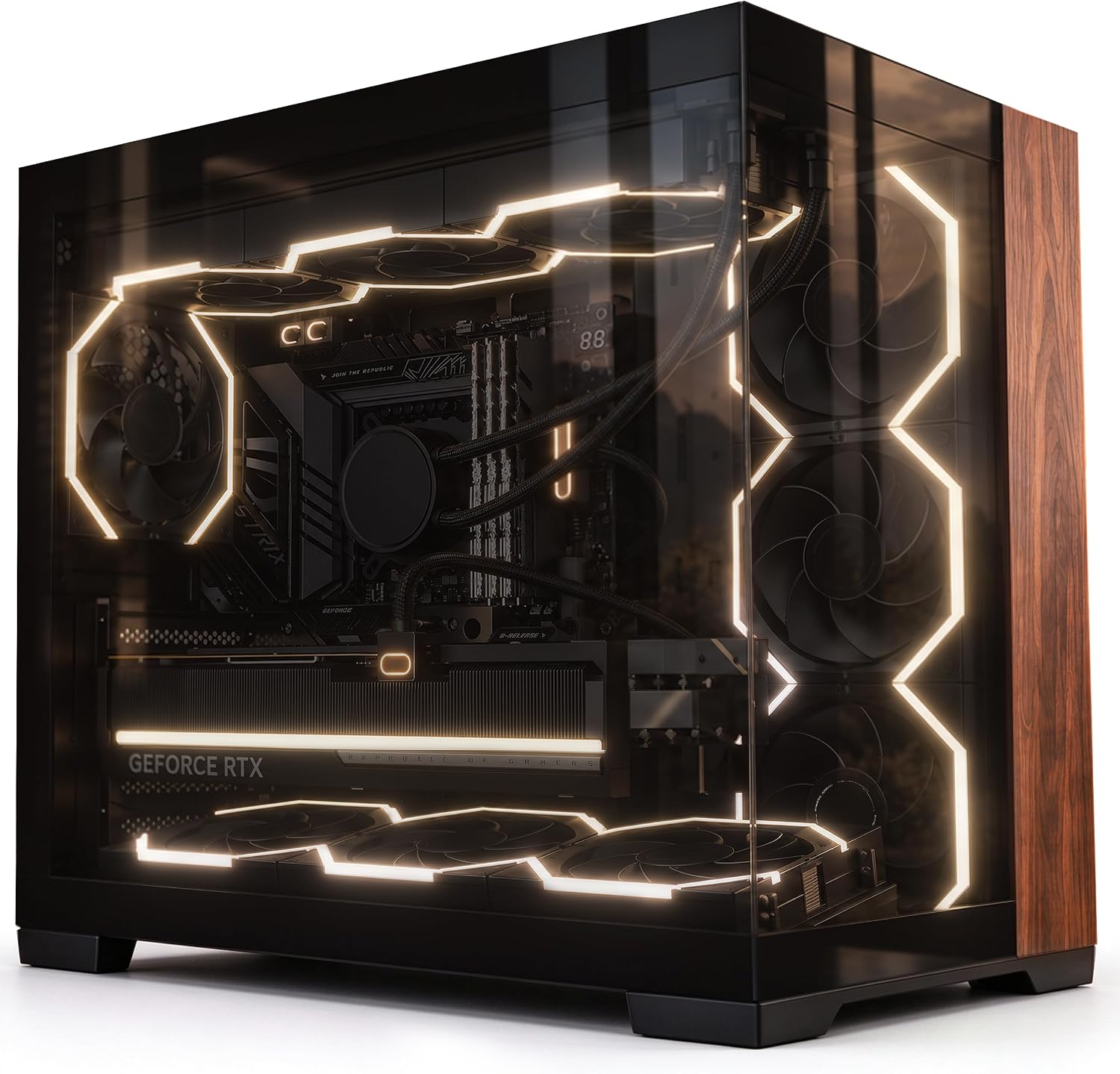
The Asiahorse SCUTUM is a dual-chamber ATX case with premium ash wood trim and a 270-degree tempered glass view. It is aimed at builders who want a case that blends into a home office or creator studio rather than looking like a traditional gaming tower.
The case uses a tilted fan bracket to direct airflow toward the graphics card, with dual intake and exhaust channels. It supports a 360mm top radiator, GPUs up to 410mm, and CPU coolers up to 160mm. The dual-chamber design hides cables behind a partition with 100mm of routing space.
The front I/O includes a 20Gbps USB-C port, which is useful for fast file transfers. The case supports ATX, M-ATX, and Mini-ITX motherboards, along with BTF back-plug mainboards. The 0.7mm steel frame and 4mm tempered glass provide a solid build.
The main trade-offs are the premium price and the fact that wood trim may not suit every setup. If you want a dual-chamber case with a distinctive, furniture-like look, this is a strong choice.
Solid ash wood trim gives the case a warmer, furniture-like appearance that can blend into a home office or living space. It is a distinctive alternative to the usual black or white gaming case.
Builders who prefer a more traditional gaming look should compare the NZXT H9 Flow RGB+. Anyone who wants a lower price should consider the HYXN H2.
As an Amazon Associate we earn from qualifying purchases, at no additional cost to you.
The ASUS A32 Plus is a dual-chamber ATX case that divides the interior into independent cooling zones for the CPU and graphics card. It is aimed at builders who want a mainstream dual-chamber case with a recognizable brand and clean cable management.
The dual-chamber design separates the main components from the power supply and drives. The panoramic tempered-glass panels provide a clear view. Four pre-installed ARGB fans provide balanced cooling, and the case supports radiators up to 360mm, GPUs up to 420mm, and CPU coolers up to 165mm.
The front panel includes a USB 10Gbps Type-C port. The case supports ATX, Micro-ATX, and Mini-ITX motherboards, with a maximum PSU length of 220mm. The main trade-off is that only four fans are included, so a high-end build may need additional fans.
This case makes sense for a builder who wants a mainstream dual-chamber design with independent cooling zones. If you want more included fans, the HYXN H2 and KEDIERS K4 are alternatives.
The dual-chamber design creates separate zones for the CPU and graphics card, which can improve airflow and thermal performance. Four ARGB fans provide a starting airflow path.
Builders who want more included fans should compare the HYXN H2 or KEDIERS K4. Anyone who wants a touchscreen should consider the HYTE Y70 Touch Infinite.
As an Amazon Associate we earn from qualifying purchases, at no additional cost to you.
The HYXN H1 is a dual-chamber ATX mid-tower case with seven pre-installed PWM ARGB fans and support for two 360mm radiators. It is aimed at builders who want a compact dual-chamber case with strong cooling capacity.
The dual-chamber layout separates the power supply and drives from the main components. The vertical airflow design uses bottom and side intakes with top and rear exhausts. The case includes three reverse-blade fans at the bottom, three reverse-blade fans on the side, and one forward-blade fan at the rear.
The case supports ATX, M-ATX, and ITX motherboards, GPUs up to 400mm, PSUs up to 200mm, and CPU coolers up to 170mm. The front I/O includes Type-C 3.0, USB 3.0, USB 2.0, and audio. Dust filters on the top and bottom help reduce dust buildup.
The main trade-offs are the smaller interior compared with the H2 and the limit of two radiator mounts. If you want dual-chamber cooling with included ARGB fans at a lower price, this is a solid option.
The bottom and side intakes feed cool air into the case, while the top and rear exhausts remove heat. This vertical airflow path can improve cooling efficiency.
Builders who want more radiator support should compare the HYXN H2. Anyone who wants a compact case should consider the STRUXVEX S6.
As an Amazon Associate we earn from qualifying purchases, at no additional cost to you.
A dual-chamber case is a layout choice that affects airflow, cable management, and the look of a build. The right case depends on your hardware, cooling plans, and space. These factors explain what to prioritize.
A dual-chamber case separates the main components from the power supply and drives, creating two distinct zones. That layout can improve airflow and make cable management easier, because the power supply cables and drive cables are hidden behind a partition. The result is often a cleaner look through a tempered-glass panel.
The depth of the rear chamber matters. A deeper chamber gives you more room for cable routing and a larger power supply. Cases with built-in Velcro straps and tie-down points make the process easier. The Asiahorse SCUTUM lists 100mm of routing space, and the HYXN H2 lists an extra-large rear compartment.
If you want a clean showcase build, prioritize a dual-chamber case with a deep rear compartment and good cable-routing features.
Dual-chamber cases often use side, bottom, and top fan mounts to create airflow paths. The KEDIERS K4 uses a dual-channel design with horizontal flow for the CPU and vertical flow for the GPU. The HYXN H1 uses bottom and side intakes with top and rear exhausts.
Pre-installed fans can save cost and effort. The HYXN H2 includes eight PWM ARGB fans, the KEDIERS K4 includes eight PWM ARGB fans, and the HYXN H1 includes seven. The NZXT H9 Flow RGB+ includes two F420 RGB fans and one F120 fan.
If you want strong airflow out of the box, prioritize a case with pre-installed fans and a clear airflow path.
High-end gaming builds often use large radiators and long graphics cards. The HYXN H2 supports 420mm radiators and GPUs up to 455mm. The NZXT H9 Flow RGB+ supports 420mm radiators. The KEDIERS K4 supports 420mm radiators and GPUs up to 460mm.
Check the radiator support and GPU clearance before buying. A case that supports a 360mm radiator may not fit a 420mm unit, and a long graphics card may conflict with front-mounted fans.
If you plan a high-end build, prioritize a case with enough radiator and GPU clearance for your components.
Dual-chamber cases support different motherboard sizes. The HYXN H2 and KEDIERS K4 support ATX, Micro-ATX, and Mini-ITX. The STRUXVEX S6 supports Micro-ATX and ITX, which limits the motherboard choice.
Check the motherboard form factor before buying. If you plan to use an ATX board, choose a case that supports ATX.
Match the case to your motherboard and expansion plans.
Front I/O varies across these cases. The HYXN H2 includes Type-C 3.2, USB 3.0, USB 2.0, and audio. The Asiahorse SCUTUM includes a 20Gbps USB-C port. The STRUXVEX S6 includes USB 2.0, which is basic.
If you use high-speed external drives or modern peripherals, prioritize a case with USB-C and USB 3.0 or faster ports.
Choose front I/O that matches your devices and workflow.
Dual-chamber cases come in different finishes. The HYTE Y70 Touch Infinite includes a 2.5K touchscreen. The Asiahorse SCUTUM uses ash wood trim. The NZXT H9 Flow RGB+ uses perforated steel panels and panoramic glass.
The finish affects the look of the build and how much maintenance it needs. White cases may show dust more easily, and glass panels need careful handling.
Choose a finish that matches your space and maintenance preferences.
Plan the build before installing components. Mount the motherboard, CPU, and cooler first, then route cables through the rear chamber. Use the cable-routing features and Velcro straps to keep the main chamber clean.
Keep the case clean by checking the fan filters and glass panels for dust every few months. Dust reduces airflow and can cause higher temperatures. Use compressed air to clean the filters and fans while the system is off.
Handle tempered-glass panels carefully during installation and cleaning. Avoid placing the case on hard surfaces that could scratch the glass, and keep the panels secure when moving the case.
A dual-chamber case separates the main components from the power supply and drives, creating two zones. This layout can improve airflow and cable management and often produces a cleaner look through a glass panel.
It can be, because the layout separates heat sources and creates dedicated airflow paths. The actual cooling performance depends on the case design, fan configuration, and components.
Many do. The HYXN H2 supports 420mm radiators, and the NZXT H9 Flow RGB+ supports 420mm radiators. Check the specific case specifications before buying a large radiator.
They can be easier because the rear chamber hides cables, but the layout takes some planning. Check the cable-routing space and the installation instructions for your specific case.
Back-connect support means the case is compatible with motherboards that route ports and cables to the rear of the board. This can create a cleaner look with fewer visible cables.
Many dual-chamber cases support long graphics cards, but clearance varies. The HYXN H2 supports GPUs up to 455mm, and the KEDIERS K4 supports up to 460mm. Check the specific case specification.
Some do. The HYXN H2 includes eight PWM ARGB fans, the KEDIERS K4 includes eight, and the HYXN H1 includes seven. Others include fewer fans or none, so check the specifications.
The HYTE Y70 Touch Infinite in Snow White, the KEDIERS K4 in Snow White, and the NZXT H9 Flow RGB+ are options. Check the finish and features that match your build.
Check the fan filters and glass panels every few months and use compressed air to clean the fans and vents. Handle tempered glass carefully and keep the panels secure.
The HYTE Y70 Touch Infinite is the strongest overall choice in this comparison for a dual-chamber gaming case. Its 14.9-inch 2.5K touchscreen, dual-chamber layout, 10-fan capacity, and included PCIe 4.0 riser make it a distinctive showcase case with strong hardware support.
For builders who want a value-focused dual-chamber case, the HYXN H2 offers eight PWM ARGB fans and 420mm radiator support at a lower price. The NZXT H9 Flow RGB+ is a premium airflow option with back-connect support, and the STRUXVEX S6 is the compact micro-ATX alternative. The Asiahorse SCUTUM stands out with its ash wood trim.
Your final decision should start with your hardware and space. Check radiator and GPU clearance, motherboard compatibility, fan capacity, and front I/O before buying. The right case is the one that fits your components and your setup without paying for features you will not use.