

GEEKOM A9 Max
4.3/ 5
Ryzen AI 9 HX470 CPU
32GB DDR5 memory
2TB NVMe SSD
86 TOPS AI compute
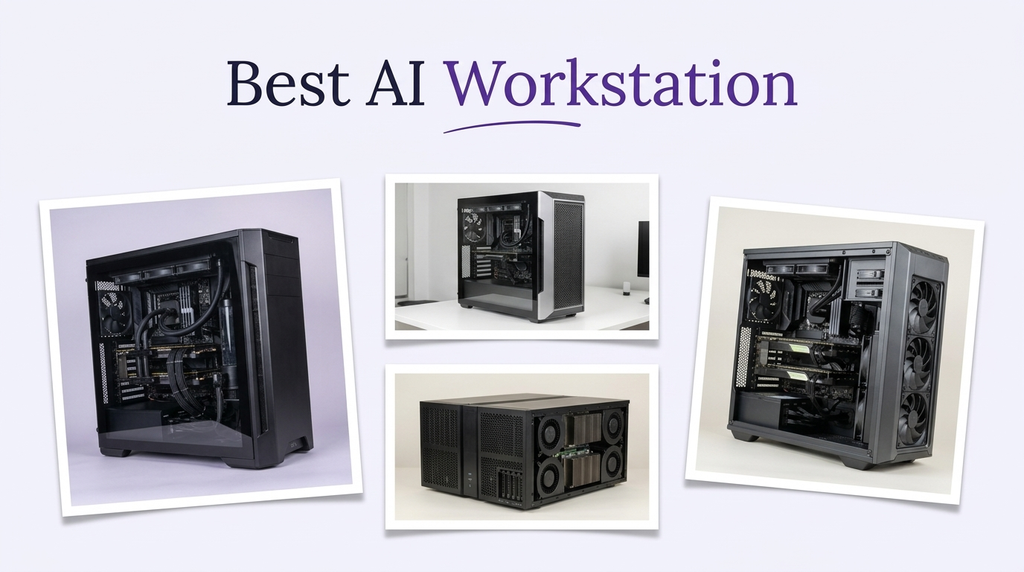
An AI workstation is judged by different priorities than a standard gaming PC or business desktop. Local model inference, fine-tuning, and generative workloads depend on unified memory capacity, memory bandwidth, NPU and GPU acceleration, and the software ecosystem that ties them together. A machine that looks powerful on paper can still stumble if it lacks the memory headroom or driver support for the models you want to run.
The options range from compact mini PCs with 128GB of unified LPDDR5X memory to full workstations with 96GB of GPU memory. Smaller configurations with 32GB of DDR5 or LPDDR5X are also available for lighter AI tasks. Each approach has trade-offs in model size, performance, expandability, and price. Buyers should match the workstation to the models and workflows they actually plan to use.
To build this guide, we compared the listed specifications and customer ratings across all ten workstations and components. We weighed memory capacity and type, NPU TOPS ratings, GPU memory, processor core counts, storage, connectivity, and operating system. We also considered how each option fits local AI development, inference, and creative workloads rather than ranking by price alone. The recommendations reflect specification-based reasoning, not measured test results.
4.3/ 5
4.3/ 5

As an Amazon Associate we earn from qualifying purchases, at no additional cost to you.
Swipe across to compare all columns
| Product | Key highlights | Rating | Explore |
|---|---|---|---|
|
Best overall
GMKtec X3
|
Ryzen AI Max+ 395
Radeon 8060S iGPU
128GB LPDDR5X memory
2TB PCIe 4.0
|
4.3/ 5 | Check Price |

Best developer platform
AMD Ryzen AI Halo
|
Ryzen AI Max+ 395
128GB unified memory
2TB M.2 SSD
10GbE LAN
|
5.0/ 5 | Check Price |

Best 64GB compact option
GMKtec EVO-X2
|
Ryzen AI Max+ 395
Radeon 8060S iGPU
64GB LPDDR5X memory
2TB SSD
|
4.3/ 5 | Check Price |
|
Best value
GEEKOM A9 Max
|
Ryzen AI 9 HX470
32GB DDR5 memory
2TB NVMe SSD
86 TOPS AI compute
|
4.3/ 5 | Check Price |

Best Intel AI mini PC
GEEKOM IT15
|
Ultra 9 285H CPU
32GB DDR5 memory
1TB NVMe SSD
99 TOPS AI compute
|
4.3/ 5 | Check Price |
|
Premium pick
HP ZGX G1n
|
GB10 Superchip
128GB unified memory
4TB SSD storage
1,000 TOPS FP4
|
Not supplied | Check Price |

Best value
Dell Pro Tower Plus
|
Core Ultra 5 235
16GB DDR5 memory
1TB SSD
13 TOPS NPU
|
4.6/ 5 | Check Price |

Best GPU component
NVIDIA RTX PRO 6000
|
RTX PRO 6000 GPU
96GB GDDR7 memory
PCIe Gen 5
DisplayPort 2.1
|
4.3/ 5 | Check Price |
Best compact workstation
HP Z2 Mini G1a 1TB
|
Ryzen AI Max PRO 380
32GB LPDDR5X memory
1TB NVMe SSD
50 TOPS NPU
|
5.0/ 5 | Check Price |

Best compact AI workstation
HP Z2 Mini G1a 1TB SSD
|
Ryzen AI Max PRO 380
32GB DDR5 memory
1TB SSD
50 TOPS NPU
|
4.2/ 5 | Check Price |
As an Amazon Associate we earn from qualifying purchases, at no additional cost to you.
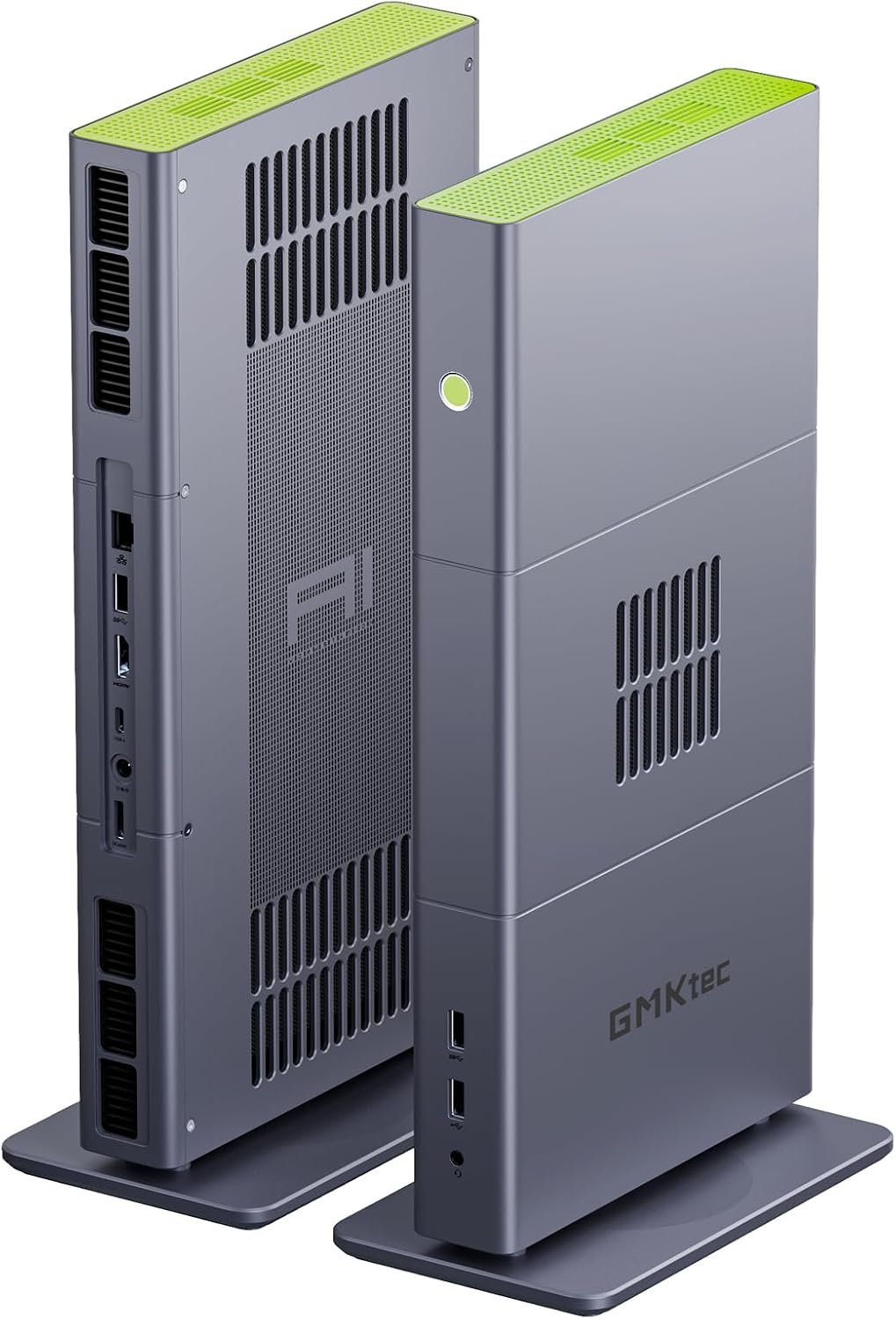
The GMKtec X3 is the Best overall pick because it pairs the 16-core Ryzen AI Max+ 395 with 128GB of LPDDR5X memory and a 2TB PCIe 4.0 SSD, and it includes an OCuLink port for an external GPU. It is aimed at AI developers who want large unified memory for local models and the option to add desktop-class graphics later.
The Ryzen AI Max+ 395 provides 16 Zen 5 cores, 32 threads, and a 50 TOPS XDNA 2 NPU. The Radeon 8060S integrated graphics with 40 RDNA 3.5 compute units handles 1080p gaming and creative workloads, and the 128GB unified memory pool can be allocated to large language models. The OCuLink port allows an external GPU dock for demanding gaming or rendering.
Connectivity includes WiFi 7, Bluetooth 5.4, and a 2.5G LAN port. The compact chassis uses a three-fan cooling design. The main limitation is that the OCuLink port does not support hot plugging, so the system must be powered off before connecting or disconnecting an external GPU.
This workstation makes sense for an AI developer who wants 128GB of memory and the flexibility to add an external GPU. If you want a simpler integrated-graphics build or the highest-rated configuration, the EVO-X2 and AMD Ryzen AI Halo are worth comparing.
In a unified memory design, the CPU, GPU, and NPU share the same memory pool. That allows large AI models to use the full 128GB rather than being limited to dedicated video memory, which is a key advantage for local inference.
Buyers who want a simpler setup without external GPU support should compare the AMD Ryzen AI Halo. Anyone who wants a full desktop GPU with 96GB of memory should consider the NVIDIA RTX PRO 6000.
As an Amazon Associate we earn from qualifying purchases, at no additional cost to you.
The AMD Ryzen AI Halo is the Best developer platform pick because it is built specifically for local AI development and inference, with 128GB of unified memory and support for up to 200B parameter models. It is aimed at developers who want a documented platform with AMD ROCm software support.
The Ryzen AI Max+ 395 provides 16 cores, 32 threads, and a 50 TOPS XDNA 2 NPU, and the Radeon 8060S integrated graphics shares the 128GB memory pool. The system includes a 2TB M.2 SSD, 10GbE LAN, WiFi 7, Bluetooth 5.4, USB-C, and HDMI 2.1b.
Windows 11 Pro is included, along with AMD ROCm software support and access to tools, models, and workflows for local AI development. The main limitation is the integrated graphics, which are not a match for a full desktop GPU in raw compute.
This workstation makes sense for a developer who wants a dedicated AI platform with large unified memory and software support. If you want a more affordable 128GB option, the GMKtec X3 is worth comparing.
Support for up to 200B parameter models means the workstation can run larger local models than systems with 32GB or 64GB of memory. That can matter for research and development workflows.
Buyers who want external GPU support should compare the GMKtec X3. Anyone who needs a full desktop GPU should consider the NVIDIA RTX PRO 6000.
As an Amazon Associate we earn from qualifying purchases, at no additional cost to you.
The GMKtec EVO-X2 pairs the Ryzen AI Max+ 395 with 64GB of LPDDR5X memory and a 2TB SSD. It is a compact AI mini PC with strong processing power and quad 8K display support, but it does not reach the 128GB capacity of the top models.
The Ryzen AI Max+ 395 provides 16 Zen 5 cores and a 50 TOPS NPU, and the Radeon 8060S integrated graphics handles 1080p gaming and creative work. The 64GB of memory is enough for many AI models and multitasking workloads, but buyers who specifically need 128GB should look at the X3 or the Ryzen AI Halo.
Connectivity includes WiFi 7, Bluetooth 5.4, 2.5GbE LAN, HDMI 2.1, DisplayPort 1.4, dual USB4, and an SD 4.0 card reader. The triple-fan cooling design supports quiet operation.
This workstation makes sense for a buyer who wants a compact AI PC with 64GB of memory. If 128GB is a firm requirement, the X3 and Ryzen AI Halo are the right fit.
64GB of unified memory is enough for many local AI models and creative workloads. Buyers who plan to run very large models or heavy virtualization should prioritize 128GB.
Buyers who specifically need 128GB of memory should choose the X3 or Ryzen AI Halo. Gamers who want a discrete graphics card should consider a desktop tower.
As an Amazon Associate we earn from qualifying purchases, at no additional cost to you.
The GEEKOM A9 Max is the Best value pick because it pairs the Ryzen AI 9 HX470 with 32GB of DDR5 memory and a 2TB NVMe SSD at a lower price than the 128GB models. It is aimed at professionals who want a compact AI workstation for development, creative work, and light gaming.
The Ryzen AI 9 HX470 provides 12 cores and 24 threads with up to 86 TOPS of AI compute, including an XDNA 2 NPU rated up to 55 TOPS. The 32GB of DDR5 memory supports many AI workloads, and the 2TB SSD provides generous storage. The Radeon 890M integrated graphics handle 1080p gaming and creative tasks.
The system supports four displays with 8K output, dual 2.5GbE LAN, WiFi 7, and USB4. The all-metal chassis and IceBlast 3.0 cooling system provide stable performance. GEEKOM backs the A9 Max with a 3-year limited warranty.
This workstation makes sense for a professional who wants a capable AI mini PC at a lower price. If you need 128GB of memory for large models, the GMKtec X3 and Ryzen AI Halo are the right fit.
32GB of memory is enough for many AI development tasks and lighter inference workloads. Buyers who plan to run large language models locally should prioritize more memory.
Buyers who need 128GB of memory should choose the GMKtec X3 or Ryzen AI Halo. Anyone who needs a full desktop GPU should consider the RTX PRO 6000.
As an Amazon Associate we earn from qualifying purchases, at no additional cost to you.
The GEEKOM IT15 is an Intel-based AI mini PC with the Core Ultra 9 285H, 32GB of DDR5 memory, and a 1TB NVMe SSD. It is aimed at creators and professionals who want a compact Intel platform for AI-assisted work.
The Core Ultra 9 285H delivers up to 99 TOPS of combined AI compute with Intel Arc 140T graphics and a dedicated NPU. The 32GB of DDR5 memory supports multitasking, and the 1TB Gen4 SSD provides fast storage. The system supports up to four displays with dual USB4 and dual HDMI.
Connectivity includes WiFi 7, Bluetooth 5.4, and 2.5GbE LAN. The system is designed for extended work with optimized cooling and a reinforced chassis. GEEKOM backs the IT15 with a 3-year limited warranty.
This workstation makes sense for a buyer who prefers an Intel platform and wants a compact AI mini PC. If you need 128GB of memory or a full desktop GPU, the GMKtec X3 and RTX PRO 6000 are better fits.
The Core Ultra 9 285H includes Intel AI Boost and Arc 140T graphics, which accelerate supported AI features in creative applications. That can help with video editing, coding, and design work.
Buyers who need more memory should choose a 128GB model. Anyone who needs a full desktop GPU should consider the RTX PRO 6000.
As an Amazon Associate we earn from qualifying purchases, at no additional cost to you.
The HP ZGX G1n is the Premium pick because it uses the NVIDIA GB10 Grace Blackwell Superchip with 128GB of coherent unified memory and a 4TB SSD. It is aimed at AI researchers and enterprises that need high AI throughput in a compact workstation.
The GB10 Superchip delivers 1,000 TOPS of FP4 AI performance, which is a different class of AI compute from the integrated NPUs in the other workstations here. The 128GB of coherent unified memory and 4TB SSD support large models and datasets. The system supports models up to 200B parameters locally.
Connectivity includes 10 Gigabit Ethernet and 200 Gigabit networking for high-speed data transfer. The mini PC form factor fits a small desktop footprint. The main limitations are the premium price and the lack of a customer rating.
This workstation makes sense for a researcher or enterprise that needs the highest AI throughput in a compact form. If you want a lower-priced 128GB option, the GMKtec X3 and Ryzen AI Halo are worth comparing.
The GB10 Superchip's FP4 AI performance is aimed at demanding inference and fine-tuning workloads. That can translate into faster model processing for large local models.
Buyers who want a lower price should compare the GMKtec X3. Anyone who needs a full desktop GPU with 96GB of memory should consider the RTX PRO 6000.
As an Amazon Associate we earn from qualifying purchases, at no additional cost to you.
The Dell Pro Tower Plus is a business desktop with the Intel Core Ultra 5 235 and a 13 TOPS NPU. It is aimed at professionals who want AI-assisted productivity in applications such as Adobe, Zoom, and Office rather than heavy local model inference.
The Core Ultra 5 235 provides strong everyday performance, and the 13 TOPS NPU accelerates supported AI features. The 16GB of DDR5 memory and 1TB SSD are adequate for office work, but they are modest for large AI models. The system supports triple 4K monitors.
Windows 11 Pro is included, along with a DVDRW drive and Gigabit Ethernet. The main limitations are the 16GB memory and the modest NPU, which are not suited to running large local models.
This workstation makes sense for a business user who wants AI-assisted productivity at a lower price. If you need to run local AI models, the 128GB mini PCs are a better fit.
The 13 TOPS NPU accelerates supported AI features in productivity and creative applications. It is not a substitute for the larger NPUs and unified memory in dedicated AI workstations.
Buyers who need to run large local models should choose a 128GB workstation. Anyone who needs dedicated GPU compute should consider the RTX PRO 6000.
As an Amazon Associate we earn from qualifying purchases, at no additional cost to you.
The NVIDIA RTX PRO 6000 is a professional graphics card with 96GB of GDDR7 ECC memory, designed for AI, design, simulation, and engineering workloads. It is the Best GPU component here for buyers who are building or upgrading a workstation rather than buying a complete system.
The card uses the Blackwell architecture with 5th Gen Tensor Cores and 4th Gen Ray Tracing Cores. The 96GB of memory and 1.8TB/s bandwidth support large AI models, 3D projects, and multi-app workflows. PCIe Gen 5 provides double the bandwidth of PCIe Gen 4.
DisplayPort 2.1 supports high-resolution displays, and universal MIG allows the GPU to be divided into isolated instances for concurrent workloads. The card is OEM packaging with a 3-year manufacturer warranty.
This card makes sense for a buyer who needs maximum GPU memory for AI or professional 3D work and has a compatible workstation. If you want a complete system, the HP ZGX G1n is a more integrated option.
GPU memory capacity determines the size of models and datasets that can be loaded directly onto the card. 96GB supports large AI models and complex 3D scenes that would not fit in smaller cards.
Buyers who want a complete system should consider the HP ZGX G1n. Anyone who needs unified memory for local inference should compare the 128GB mini PCs.
As an Amazon Associate we earn from qualifying purchases, at no additional cost to you.
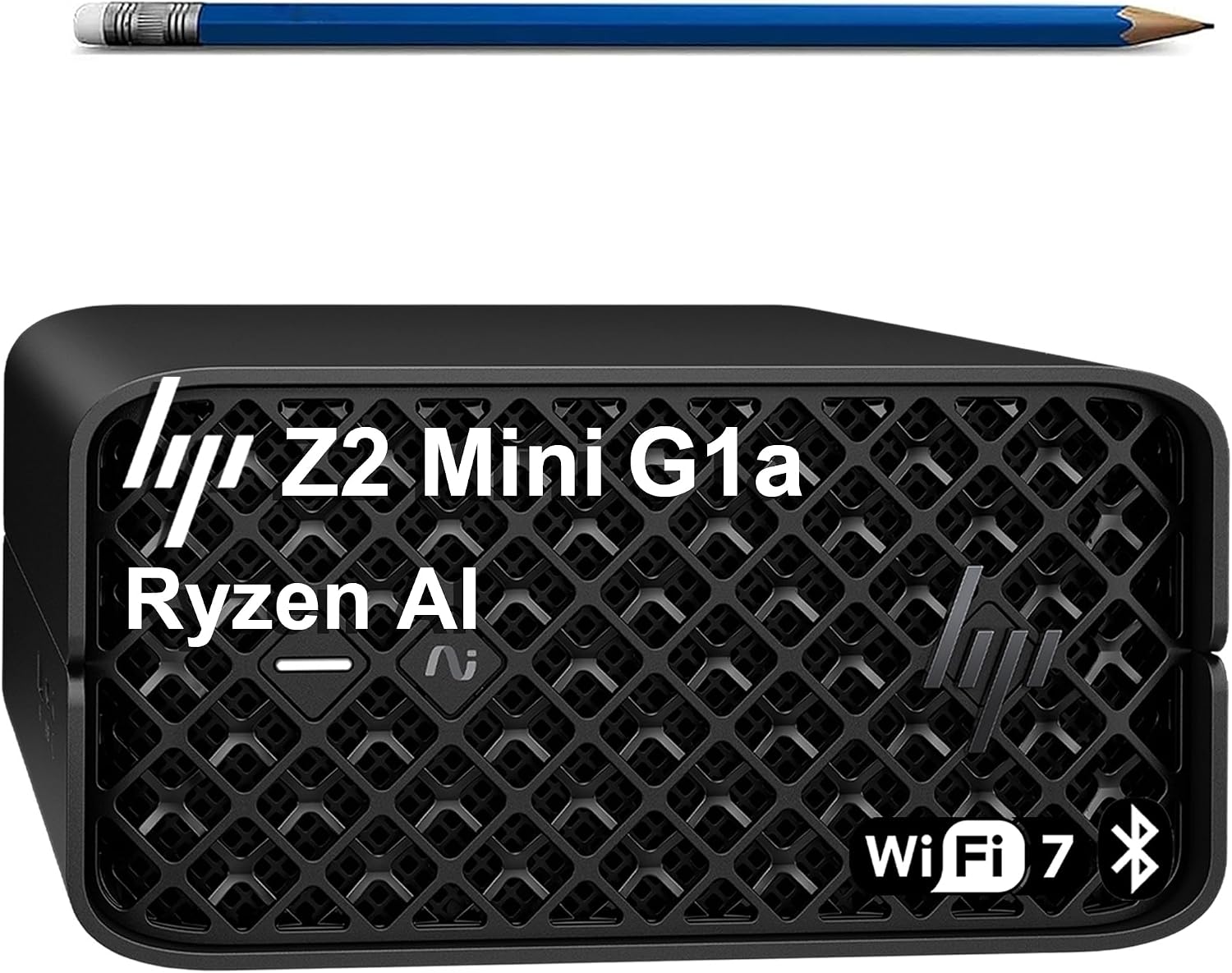
The HP Z2 Mini G1a is a compact workstation with the AMD Ryzen AI Max PRO 380 and 32GB of LPDDR5X memory. It is aimed at engineers, architects, and creators who need ISV-certified performance for CAD, 3D modeling, and local AI workloads.
The Ryzen AI Max PRO 380 provides a 50 TOPS NPU that supports local execution of 10B+ parameter models. The 32GB of LPDDR5X memory supports multitasking, and the 1TB NVMe SSD provides fast storage. The Radeon 8040S graphics handle creative and professional tasks.
The system is ISV-certified for applications including AutoCAD, Creo, SOLIDWORKS, ANSYS, and MATLAB. Connectivity includes Thunderbolt 4, USB-C, Mini DisplayPort 2.1, five USB-A ports, Ethernet, WiFi 7, and Bluetooth 5.4. The compact chassis is MIL-STD 810H tested.
This workstation makes sense for a professional who needs a compact, ISV-certified machine for CAD and local AI. If you need more memory for large models, the 128GB mini PCs are a better fit.
ISV certification indicates that the workstation has been tested with professional applications such as AutoCAD and SOLIDWORKS. That can reduce compatibility risk for critical workflows.
Buyers who need 128GB of memory should choose the GMKtec X3 or Ryzen AI Halo. Anyone who needs a full desktop GPU should consider the RTX PRO 6000.
As an Amazon Associate we earn from qualifying purchases, at no additional cost to you.
This HP Z2 Mini G1a configuration pairs the Ryzen AI Max PRO 380 with 32GB of DDR5 memory and a 1TB SSD. It is aimed at professionals who need a compact, ISV-certified workstation for CAD, 3D, and local AI workloads.
The Ryzen AI Max PRO 380 provides a 50 TOPS NPU for local AI acceleration and supports 10B+ parameter models. The 32GB of DDR5 memory supports multitasking, and the 1TB SSD provides fast storage. The Radeon 8040S graphics handle creative and professional tasks.
The system is ISV-certified for AutoCAD, ANSYS, SOLIDWORKS, Creo, and MATLAB. Connectivity includes Thunderbolt 4, USB-C, Mini DisplayPort 2.1, five USB-A ports, Ethernet, WiFi 7, and Bluetooth 5.4. HP provides a one-year warranty.
This workstation makes sense for a professional who needs a compact, ISV-certified machine with HP support. If you need more memory for large models, the 128GB mini PCs are a better fit.
The Z2 Mini G1a is suited to CAD, 3D modeling, simulation, and light local AI workloads. It is not designed for large model inference or heavy GPU compute.
Buyers who need 128GB of memory should choose the GMKtec X3 or Ryzen AI Halo. Anyone who needs a full desktop GPU should consider the RTX PRO 6000.
As an Amazon Associate we earn from qualifying purchases, at no additional cost to you.
An AI workstation is defined by memory, acceleration, and software support rather than raw gaming performance. These factors explain what to prioritize.
AI workstations here use two memory approaches. The mini PCs use unified LPDDR5X memory shared across the CPU, GPU, and NPU, which allows large models to use the full memory pool. The NVIDIA RTX PRO 6000 uses 96GB of dedicated GDDR7 memory on the GPU.
Unified memory is advantageous for running large models on integrated hardware, while dedicated GPU memory is advantageous for GPU-accelerated workloads and multi-instance deployments. The right choice depends on the models and software you use.
If you want to run large local models on a compact system, prioritize unified memory. If you need maximum GPU compute, prioritize a dedicated GPU.
Memory capacity determines the size of models you can run locally. 32GB is enough for many development tasks and lighter inference, 64GB supports larger models, and 128GB supports models in the 70B to 200B range depending on quantization.
Buyers should match memory to the models they plan to run. Running a model that exceeds available memory requires offloading, which slows performance.
Choose 128GB if you plan to run large local models. Choose 32GB or 64GB for lighter workloads.
NPUs accelerate AI tasks with lower power draw, while GPUs provide broader compute for training, rendering, and inference. The workstations here list NPU ratings from 13 TOPS to 50 TOPS, and the HP ZGX G1n lists 1,000 TOPS FP4 from the GB10 Superchip.
Higher TOPS ratings generally indicate more AI throughput, but real-world performance depends on software support and the workload. Check that your AI framework supports the NPU or GPU.
If AI acceleration is central to your work, prioritize a workstation with a strong NPU or GPU and confirmed software support.
The processor handles general computing and can affect model loading and data preprocessing. The workstations here range from six-core to 16-core processors. Storage capacity matters for datasets, model files, and checkpoints, with options from 1TB to 4TB.
If you work with large datasets, prioritize more storage. If you run many concurrent tasks, prioritize more cores.
Balance processor, memory, and storage with your AI workload.
AI software support varies by platform. The AMD Ryzen AI Halo lists AMD ROCm software support and access to tools, models, and workflows. The NVIDIA RTX PRO 6000 benefits from NVIDIA's AI software ecosystem. Intel platforms use Intel AI Boost.
Check that your preferred framework and models support the hardware before buying. Software support can matter as much as raw specifications.
Prioritize a platform with confirmed support for your AI tools.
AI workstations come in compact mini PC and full desktop forms. Mini PCs save space but offer limited upgrade options. The GMKtec X3 includes OCuLink for an external GPU, which adds flexibility.
If you plan to upgrade the GPU or add storage later, check the expansion options before buying.
Choose a form factor that matches your space and upgrade plans.
Set up your workstation with adequate airflow, keeping clearance around the vents. Install the latest drivers and AI frameworks for your platform, and confirm that your models run within available memory.
Monitor temperatures during long inference or training sessions. Use the performance modes on compact mini PCs to balance power and noise, and keep the cooling system clean of dust.
Back up model files and datasets regularly. Keep the operating system and AI software updated to maintain compatibility and performance.
A good AI workstation combines sufficient memory for your models, strong NPU or GPU acceleration, a capable processor, fast storage, and confirmed software support. The right balance depends on whether you prioritize local inference, training, or creative work.
32GB is enough for many development tasks and lighter inference, 64GB supports larger models, and 128GB supports models in the 70B to 200B range depending on quantization. Match memory to the models you plan to run.
Unified memory is shared across the CPU, GPU, and NPU, allowing large models to use the full memory pool. That is useful for running large models on compact systems with integrated graphics.
A dedicated GPU provides more raw compute for training and GPU-accelerated workloads. Integrated NPUs and GPUs can handle many inference tasks, especially with unified memory. The right choice depends on your workload.
TOPS measures AI operations per second. Higher ratings generally indicate more AI throughput, but real-world performance depends on software support, memory, and the specific workload.
Upgrade options are limited on many mini PCs. Some models offer expandable memory or storage, and the GMKtec X3 includes OCuLink for an external GPU. Check the specifications before buying.
Windows 11 Pro supports business features such as BitLocker and Remote Desktop, which can matter for professional deployments. Many AI workstations here include it.
Check that your AI frameworks and models support the platform's NPU or GPU. AMD ROCm, NVIDIA CUDA, and Intel AI Boost have different levels of support depending on the software.
The GMKtec X3 and AMD Ryzen AI Halo offer 128GB of unified memory, and the HP ZGX G1n offers 128GB with the GB10 Superchip. The NVIDIA RTX PRO 6000 offers 96GB of dedicated GPU memory for GPU-accelerated workloads.
The GMKtec X3 is the strongest overall choice in this comparison for an AI workstation. Its 16-core Ryzen AI Max+ 395, 128GB of LPDDR5X memory, 2TB SSD, and OCuLink external GPU support make it a flexible platform for local AI development and inference.
For developers who want a documented platform with ROCm support, the AMD Ryzen AI Halo is a strong alternative. The HP ZGX G1n offers the highest AI throughput with the GB10 Superchip, and the NVIDIA RTX PRO 6000 provides 96GB of dedicated GPU memory for GPU-accelerated work. Budget buyers should consider the GEEKOM A9 Max and IT15, keeping their 32GB memory limits in mind.
Your final decision should start with the models and software you plan to use. Prioritize memory capacity for large models, confirm software support for the NPU or GPU, and choose a form factor that fits your space. The right workstation is the one that matches your AI workload and budget without paying for capability you will not use.