

Logitech G305
4.6/ 5
12,000 DPI HERO sensor
LIGHTSPEED 1 ms wireless
250-hour AA battery
Lightweight portable shape
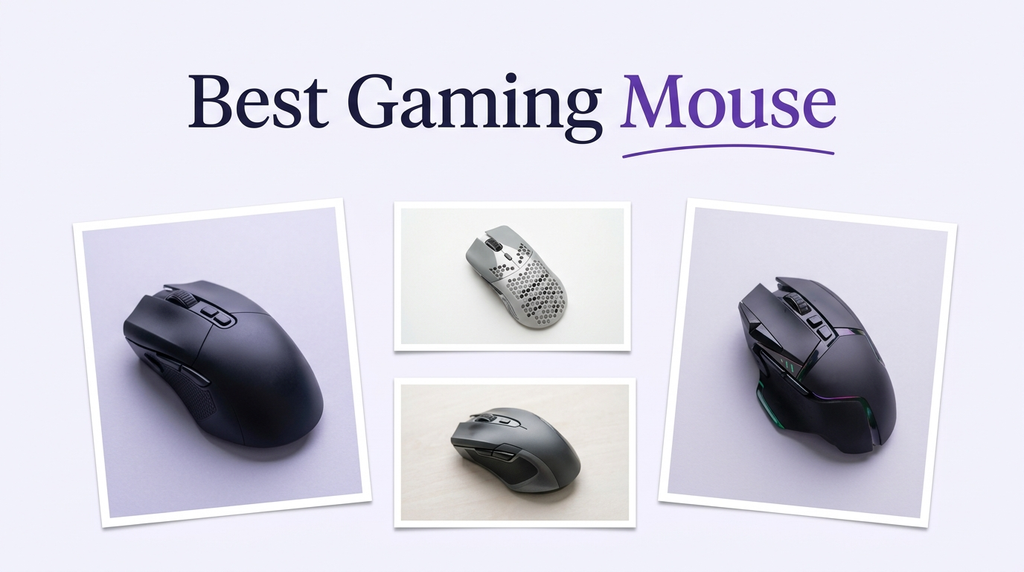
Choosing a gaming mouse in 2026 means balancing sensor precision, click latency, weight, and wireless endurance against the way you actually play. This guide compares 10 popular options across esports-focused flyweights, ergonomic MMO-style shapes, and feature-packed hybrids so you can match the right pointer to your genre, grip, and desk setup.
Spec sheets alone rarely tell the full story. A 44,000 DPI sensor is meaningless without comfortable click force, a stable shape, and polling that your monitor can keep up with. The products below span wired and wireless designs from Logitech and Razer, with battery claims from 60 hours to over 500 hours and weights from 49 to 115 grams.
To compare these mice fairly, we looked at the specifications buyers actually feel day to day: sensor class and tracking speed, switch type and rated click lifespan, true polling rate, weight distribution, grip shape, number of programmable controls, battery endurance where relevant, and software ecosystem. We also weighed public customer ratings, included accessories, and value for money so each pick suits a clear style of player rather than a generic highest-score winner.
4.6/ 5

4.6/ 5

4.6/ 5
As an Amazon Associate we earn from qualifying purchases, at no additional cost to you.
Swipe across to compare all columns
| Product | Key highlights | Rating | Explore |
|---|---|---|---|
|
Premium pick
Logitech G PRO X2 SUPERSTRIKE
|
44,000 DPI HERO 2
Haptic trigger feedback
8 kHz LIGHTSPEED polling
60-90 hour battery
|
4.6/ 5 | Check Price |

Best for ultralight esports
Razer Viper V4 Pro
|
49-gram ultralight build
Focus Pro 50K sensor
True 8000 Hz polling
Up to 180 hours
|
4.5/ 5 | Check Price |

Best for MMO and MOBA
Logitech G502 Lightspeed
|
HERO 25K sensor
11 programmable buttons
LIGHTSPEED wireless connection
PowerPlay charging ready
|
4.6/ 5 | Check Price |
|
Best value
Logitech G305
|
12,000 DPI HERO
LIGHTSPEED 1 ms wireless
250-hour AA battery
Compact classic shape
|
4.6/ 5 | Check Price |

Best for wired setups
Razer Basilisk V3
|
Focus+ 26K sensor
11 programmable buttons
HyperScroll tilt wheel
11-zone Chroma RGB
|
4.6/ 5 | Check Price |

Best for maximum customization
Logitech G502 X Plus
|
HERO 44K sensor
13 programmable controls
LIGHTFORCE hybrid switches
LIGHTSYNC RGB lighting
|
4.4/ 5 | Check Price |
|
Best overall
Razer Viper V3 Pro
|
54-gram symmetrical shell
Focus Pro 35K sensor
8000 Hz HyperPolling
95-hour battery life
|
4.6/ 5 | Check Price |

Best for long battery life
Razer Viper V3 HyperSpeed
|
82-gram balanced body
Focus Pro 30K sensor
280-hour AA battery
HyperSpeed wireless dongle
|
4.3/ 5 | Check Price |

Best ergonomic flagship
Razer Basilisk V3 Pro
|
Focus Pro 35K sensor
13 customizable controls
140-hour battery life
13-zone Chroma underglow
|
4.4/ 5 | Check Price |

Best for hybrid work and play
Razer Basilisk V3 X HyperSpeed
|
Razer 5G 18K sensor
9 programmable controls
285-hour HyperSpeed battery
Bluetooth multi-device support
|
4.4/ 5 | Check Price |
As an Amazon Associate we earn from qualifying purchases, at no additional cost to you.
The Logitech G PRO X2 SUPERSTRIKE sits at the top of Logitech's esports lineup and is aimed at competitive players who want every possible millisecond shaved from their inputs. Designed with input from pro athletes, it combines the HERO 2 sensor with a haptic trigger system that provides tactile feedback as you press the main buttons, giving a crisper sense of actuation than traditional mechanical switches.
Performance is the headline here. The HERO 2 sensor tracks at over 888 IPS and 88 g of acceleration, with a ceiling of 44,000 DPI that most players will never approach but that signals the sensor's accuracy at normal settings. Ten actuation levels plus five rapid trigger reset stages let you tune how shallow or deep each click fires, which matters in competitive shooters where tap-firing cadence can define a round.
On the usability side, the 0.7 mm thin-wall case keeps the mouse light without feeling fragile, and extra-large UHMWPE feet glide smoothly across cloth or hard pads. LIGHTSPEED wireless at 8 kHz keeps the connection lag-free, and advertised battery life lands between 60 and 90 hours depending on polling rate, so a long session or two per week is realistic between charges. POWERPLAY compatibility means you can skip the cable entirely if you add the compatible mat.
For most casual players, this mouse is overkill in both features and price. But for ranked ladder grinders, FPS specialists, and tournament hopefuls who already live in Logitech G HUB, it offers genuinely meaningful customization and the kind of click tuning you usually only find in boutique esports gear.
Rapid trigger reset and multi-level actuation are features that originated in keyboards and are now reaching high-end mice. Being able to set how far you push before a click registers, and how little you have to release before the next click, lets you align the mouse's feel with your personal timing. Players who tap-fire in tactical shooters will likely notice the difference most clearly.
If you mostly play slower-paced strategy games, MMOs, or single-player titles, the premium spent on haptic triggers and 8 kHz polling is unlikely to translate into visible gains. Players on that profile will often be better served by a more affordable wireless mouse with a comfortable shape and a solid 1000 Hz sensor.
As an Amazon Associate we earn from qualifying purchases, at no additional cost to you.
The Viper V4 Pro is Razer's answer to the ultralight esports arms race, trimming weight to just 49 grams while retaining a full-size symmetrical shape. It is built for the kind of player who tracks moving targets at high sensitivity and wants the mouse to disappear under their palm during long sessions. For fingertip and claw grippers, that weight reduction can genuinely reduce fatigue.
Tracking is handled by the Focus Pro 50K Gen-3 sensor, rated at 930 IPS and 90 g of acceleration, with Razer's Frame Sync feature aligning sensor data to reduce perceived latency further. True 8000 Hz polling over HyperSpeed Wireless Gen-2 is a serious upgrade for anyone running a high-refresh monitor and a modern CPU, though you can dial polling down to 1000 Hz to stretch battery life to about 180 hours.
Razer has also swapped to an optical scroll wheel this generation, which tends to be more consistent over time than mechanical encoders and provides a cleaner click per notch. The Gen-4 optical main switches carry a 100 million click rating, which effectively removes the double-click failure that plagued earlier wireless esports mice. Grip tape is included in the box for players who want extra confidence during fast swipes.
If you take competitive FPS seriously and your current mouse feels too heavy, the Viper V4 Pro is one of the clearest upgrades on the market. It is less ideal for buyers who want sculpted ergonomic support, a thumb rest, or lots of extra side buttons.
True 8 kHz polling only provides a visible benefit when the rest of the chain can keep up. You generally want a high-refresh monitor, a modern CPU with headroom, and a game engine that updates input often. If you run a 60 Hz display or an older system, 1000 Hz polling and the extended battery life are usually the better choice.
Players with large hands who prefer a sculpted ergonomic shape or a prominent thumb rest will likely find the symmetrical Viper shell too flat. In that case, a Basilisk-style ergonomic mouse is a more comfortable fit for long palm-grip sessions.
As an Amazon Associate we earn from qualifying purchases, at no additional cost to you.
The Logitech G502 Lightspeed is the wireless evolution of one of the most recognizable gaming mice of the last decade. It targets players who want a lot of inputs under their hand without carrying the extra cost of a dedicated MMO-class mouse, making it an excellent fit for MOBA, MMO, and ARPG players who bind many abilities to spare buttons.
At the core sits the HERO 25K sensor, which Logitech freely updates through G HUB. With a sensitivity range from 100 to 25,600 DPI, zero smoothing, and a 400+ IPS tracking speed, it has more than enough performance for any mainstream genre. LIGHTSPEED wireless provides a stable, low-latency link that matches most wired setups in day-to-day use.
The hallmark here is the 11-button layout combined with Logitech's hyper-fast scroll wheel, which can free-spin for rapid document or menu navigation or ratchet for precise weapon switching. For players juggling many hotkeys, this is quietly the most useful feature of the mouse. The body is compatible with the separately sold POWERPLAY charging mat, which keeps the battery topped up without plugging in.
The main compromise is weight. Compared to modern 50-60 gram esports mice, the G502 feels substantial, which some competitive players will dislike. But for buyers who want a full-featured wireless workhorse that handles everything from Rust raids to spreadsheet work, it still holds up remarkably well.
Button count only matters if you actually bind the controls. In G HUB you can create per-game profiles so the same physical button does different things in different titles. Start by assigning the two most-used abilities or utilities, then grow the layout gradually, rather than trying to memorize all eleven commands at once.
If you play competitive FPS at high sensitivity and you care about ultralight weight, the G502's heft will feel noticeable during long tracking sessions. A Viper-class mouse or the G305 will suit that style better.
As an Amazon Associate we earn from qualifying purchases, at no additional cost to you.
The G305 is the mouse most buyers underestimate. It brings genuine LIGHTSPEED wireless performance to an entry-level price, which makes it an easy recommendation for students, laptop users, and anyone upgrading from a basic office mouse. The classic Logitech symmetrical shape is familiar and fits a wide range of hand sizes.
Its HERO sensor caps at 12,000 DPI, which is well above what any mainstream player needs, and the 1 ms response time means wireless feel is competitive with wired budget options. For esports, this sensor has been more than capable across many years of play, especially at the moderate DPI ranges most FPS players use.
The power design is also unusually practical. A single AA battery powers the mouse for up to 250 hours, so instead of docking or plugging in regularly, you simply swap in a fresh cell every few months. The receiver tucks into a compartment inside the mouse, making the G305 ideal for travel or hot-desk setups.
The compromises are predictable at this price. There is no RGB, the side button count is limited, and heavier palm grippers may want a larger shape. But as a dependable wireless mouse at a low price, with Logitech's software ecosystem behind it, it is one of the best overall values in the category.
If you plan to use the G305 heavily, consider rechargeable AA cells with a basic charger. You will get most of the convenience of a built-in battery while still being able to swap in a fresh cell during an unexpectedly long session. Keep one spare in your bag and the mouse effectively never dies on you.
Players who prefer a rechargeable battery, more side buttons, or a sculpted ergonomic shape will outgrow the G305 quickly. Those buyers will be happier with a G502 Lightspeed or a Basilisk-class ergonomic mouse.
As an Amazon Associate we earn from qualifying purchases, at no additional cost to you.
The Basilisk V3 is Razer's workhorse ergonomic mouse at a reasonable price. It targets right-handed players who want a sculpted shape, generous thumb rest, and plenty of programmable inputs without stepping up to a flagship wireless model. For most desktop setups where you do not really need a cable-free mouse, it is a sensible pick.
The Focus+ 26K optical sensor handles tracking cleanly, with no smoothing and reliable movement across different surfaces. Gen-2 optical switches rated for 70 million clicks and a 0.2 ms actuation speed give the main buttons a crisp feel while largely eliminating the double-click issues that plague some older mechanical designs.
The signature feature is the HyperScroll tilt wheel, which can switch between tactile cycling and free-spin modes. Free-spin is great for scanning long documents and websites, while the tactile mode is more useful for weapon cycling or ability switching in games. Eleven programmable buttons, including tilt clicks on the wheel, provide plenty of room for custom binds.
RGB fans will appreciate the 11-zone Chroma lighting, which syncs with a large library of integrated games. The main limitation is that this is a wired mouse, so if you want a tidy wireless desk or a mobile setup, one of the Basilisk wireless models will suit you better.
A wired mouse removes any concern about charging, dongle slot usage, or wireless interference in dense signal environments. For many desktop gamers who never move the mouse, a lightweight paracord-style cable is essentially invisible after a short period of use, and the money saved can go toward a better mouse pad or monitor.
Left-handed users and anyone needing wireless freedom should look elsewhere. The Basilisk shape is sculpted specifically for the right hand, and this particular model does not offer a battery option.
As an Amazon Associate we earn from qualifying purchases, at no additional cost to you.
The G502 X Plus is the modernized flagship of the G502 family. It keeps the signature aggressive silhouette but refines the shape, cuts internal weight, and adds LIGHTSYNC RGB. For players who liked the old G502 ergonomics but wanted a more polished and feature-rich wireless experience, this is the natural step up.
At its heart sits the HERO 44K sensor with sub-micron accuracy, zero smoothing, and no acceleration, backed by LIGHTSPEED wireless for pro-grade responsiveness. The LIGHTFORCE hybrid switches combine optical speed with a tactile mechanical feel, which many players find offers the best of both worlds in terms of response time and click satisfaction.
Customization is where this mouse really stands out. Thirteen programmable controls, a reversible and removable DPI-shift button, and a dual-mode scroll wheel let you shape the mouse around how your hand actually moves. Eight RGB LEDs provide subtle but flexible lighting, and the system intelligently dims when the mouse is idle to conserve battery.
Compared to pure esports mice, the G502 X Plus is heavier and has a slightly lower average customer rating, which may reflect its more complex design. However, for creators, MMO players, and hybrid work-plus-gaming users, the depth of configuration and overall polish justify the premium.
The removable DPI-shift lever is often overlooked, but it is a powerful tool. In shooters, you can map it to a low-DPI sniper mode and hold it while aiming down sights. In creative apps, you can use it for precision zoom or brush sizing. If it gets in the way for your grip, simply pop it off and keep the surface smooth.
If you want the lightest possible mouse for twitch shooters, the extra weight and controls of the G502 X Plus will work against you. A Viper V3 Pro or V4 Pro offers a far more minimalist feel for that style of play.
As an Amazon Associate we earn from qualifying purchases, at no additional cost to you.
The Viper V3 Pro has become a staple on competitive FPS desks for good reason. At 54 grams it is still in the ultralight category, but the shape is a touch more universal than extreme flyweights, making it comfortable for a wide range of hand sizes and grip styles. If you are unsure which esports mouse to pick, this is usually the safe default.
The Focus Pro 35K Gen-2 sensor delivers pro-grade tracking across cloth, hard, and even glass surfaces, with 1-DPI step adjustments for players who want very granular tuning. Combined with true 8000 Hz HyperPolling wireless, inputs feel immediate on compatible hardware, while 1000 Hz polling extends endurance to the advertised 95-hour window.
Gen-3 optical switches have a 90 million click lifespan and a 0.2 ms actuation with no debounce delay, which keeps clicks sharp through long tournament schedules. The dongle has been redesigned to maintain a solid wireless connection even in congested environments, which matters a lot at LAN events and crowded setups.
The compromises are the usual esports mouse trade-offs: minimal side buttons, no RGB, and a symmetrical shape that will not be sculpted enough for everyone. But if your priority is competitive performance in FPS, battle royale, or arena shooter titles, the Viper V3 Pro is one of the most well-rounded choices available.
For most FPS players, a sensor as capable as this one performs best when used in the 400 to 1600 DPI range paired with a lower in-game sensitivity. Start around 800 DPI and adjust in small steps based on comfort and the arm swing needed for 180 degree turns. High DPI numbers rarely improve aim and usually just make tracking harder.
Buyers who want a lot of programmable buttons, a thumb rest, or RGB lighting should look at the Basilisk V3 Pro or G502 X Plus instead. The Viper V3 Pro is intentionally minimal and focused on competitive performance.
As an Amazon Associate we earn from qualifying purchases, at no additional cost to you.
The Viper V3 HyperSpeed is a practical wireless option for players who want strong performance without worrying about charging schedules. At 82 grams, it is not the lightest mouse in the Viper lineup, but its mass is centralized so swipes still feel controlled and predictable. For intermediate competitive players and daily drivers, that balance is often a better fit than extreme flyweight shells.
The Focus Pro 30K optical sensor has forward placement for finer feedback on quick aim adjustments, and it tracks well across a wide range of surfaces including glass. It is backed by HyperSpeed Wireless for a stable low-latency connection that stays reliable even in environments with other wireless devices nearby.
The headline feature is battery life. A single AA cell delivers up to 280 hours of use, which for many users means several months between swaps. On-mouse DPI control lets you cycle through five stages without opening the software, which is helpful for quickly switching between sensitivity profiles across games. Gen-2 mechanical switches with gold-plated contacts help maintain crisp clicks over a 60 million click lifespan.
This mouse is best for players who want pro-tier sensor performance and solid wireless feel without paying flagship prices, and who appreciate the simplicity of a swappable AA battery. It is less suitable for buyers who want very low weight or who dislike mice that cannot be recharged over USB.
The feel of a mouse is shaped as much by where its weight sits as by how much it weighs in total. A mass-centralized design places the heaviest components near the middle, which reduces how much the mouse resists starting and stopping movement. In practice, this makes an 82 g mouse feel noticeably livelier than a heavier mouse with weight concentrated at the front or back.
Players chasing the lightest possible esports mouse or those who prefer rechargeable internal batteries will want to look at the Viper V3 Pro or V4 Pro instead. The AA format trades a small weight penalty for extremely long runtime.
As an Amazon Associate we earn from qualifying purchases, at no additional cost to you.
The Basilisk V3 Pro is Razer's ergonomic flagship, pairing a sculpted right-handed shape with the high-end Focus Pro 35K sensor and extensive customization. It is ideal for palm grippers and gamers who want a mouse that feels substantial under the hand and can handle both long work sessions and intense games without switching peripherals.
The HyperScroll tilt wheel can now be configured in Synapse to free-spin, ratchet, or automatically switch based on scroll speed. Combined with 13 customizable controls, including a multi-function trigger on the side, it gives you a lot of flexibility to map push-to-talk, pings, ability rotations, or productivity shortcuts without running out of inputs.
HyperSpeed Wireless provides up to 140 hours of battery life, with the option to unlock true 8000 Hz polling if you add the Razer Mouse Dock Pro or HyperPolling Wireless Dongle, both sold separately. Chroma lighting across 13 zones, including full underglow, is one of the most eye-catching implementations currently available and reacts dynamically with a long list of integrated titles.
The Basilisk V3 Pro is not the lightest mouse on this list, and some of its most advanced features sit behind extra accessories. But if you want a flagship ergonomic wireless mouse that can handle everything from creative work to late-night ranked sessions, it is one of the most complete packages Razer offers.
Razer effectively splits its top wireless lineup into two camps. Viper mice target competitive FPS players who want low weight, symmetrical shapes, and minimal distractions. Basilisk mice target ergonomic users who want a sculpted shape, more buttons, and advanced features like the HyperScroll wheel. Choose based on your grip style and the genres you play most.
If budget is tight or if you want the Basilisk shape without the flagship price, the Basilisk V3 X HyperSpeed delivers a very similar silhouette at a fraction of the cost, trading some sensor performance and features for great battery life.
As an Amazon Associate we earn from qualifying purchases, at no additional cost to you.
The Basilisk V3 X HyperSpeed brings the iconic Basilisk silhouette down to a much friendlier price while adding something few mice at this tier offer: dual-mode wireless. You can use low-latency HyperSpeed for gaming or Bluetooth for a secondary device like a laptop or tablet, which makes it a strong choice for anyone juggling work and play from the same desk.
Nine programmable controls let you assign macros and commands across the easily reached side and top buttons, which is plenty for most games and productivity apps. The Razer 5G Advanced 18K optical sensor is not the flagship, but it offers reliable pixel-precise tracking with no spinouts at the sensitivities most people actually use.
Battery life is one of the strongest arguments for this mouse. Razer rates it at up to 285 hours over HyperSpeed Wireless and up to 535 hours over Bluetooth on a single AA cell. In practical terms, that means you can rely on it for months of mixed use before thinking about a swap. Gen-2 mechanical switches with gold-plated contacts help the main buttons stay consistent over time.
If you want a true competitive esports mouse, a higher-tier sensor and lower weight will serve you better. But as a comfortable all-rounder for home office setups, creators, and casual-to-serious gamers who move between devices, the Basilisk V3 X HyperSpeed is one of the most practical picks on this list.
Dual wireless is more useful than it sounds. Pair the mouse to your main desktop over HyperSpeed for low-latency gaming, then use Bluetooth with a laptop, tablet, or secondary PC. A quick toggle lets you switch without replugging anything, which is ideal for people who often jump between devices during the workday.
Competitive FPS players who need the highest-tier sensor and lower weight will be better served by the Viper V3 Pro or V4 Pro. The Basilisk V3 X trades some performance for comfort, flexibility, and endurance.
As an Amazon Associate we earn from qualifying purchases, at no additional cost to you.
A good gaming mouse should feel invisible in your hand while giving you more control than a generic office model. Use the following factors to narrow down which style suits the games you play, the way you grip, and the setup you work with every day.
The sensor is the component that translates every physical movement into cursor data, so it has the most direct effect on how accurate and consistent the mouse feels. Modern flagship sensors such as the Logitech HERO 2, HERO 44K, and Razer Focus Pro 35K and 50K families track at hundreds of inches per second with no smoothing or acceleration. In practical terms that means they maintain accuracy during fast flicks and sudden direction changes, which is exactly when cheap sensors tend to fail.
DPI numbers are often marketed as if higher is always better, but most competitive players use between 400 and 1600 DPI combined with a lower in-game sensitivity. What really matters is whether the sensor stays accurate at the DPI you actually choose. If you frequently swap between high-DPI quick navigation and low-DPI sniping, look for a model with an easy-to-reach DPI button, like the Logitech G502 series or the Razer Viper V3 HyperSpeed.
In short, pick a sensor that is reputable and well-reviewed rather than the one with the biggest numbers. Any flagship sensor on this list will outperform what most players can actually feel.
Weight determines how quickly you can start and stop motions and how tired your hand feels after a long session. Ultralight mice in the 49 to 60 gram range, such as the Razer Viper V4 Pro and Viper V3 Pro, favor aggressive flick-aiming common in competitive shooters. Mice in the 80 to 115 gram range feel more planted and work well for players who prefer slower, more deliberate movements.
Shape and grip style go hand in hand. Symmetrical shapes like the Viper line suit fingertip and claw grips and generally accommodate a wider range of hand sizes. Ergonomic shapes like the Basilisk series are sculpted for right-handed palm grippers who want their whole hand supported. A larger hand with a palm grip on a tiny mouse will cramp quickly, just as a small hand with a claw grip on a large ergonomic mouse will struggle to reach the side buttons.
If possible, measure your hand from wrist crease to middle fingertip, then compare that with each mouse's length and width. Match the shape to how you naturally rest your hand, not to how a product looks in photos.
Modern 2.4 GHz gaming wireless, such as Logitech LIGHTSPEED and Razer HyperSpeed, is effectively indistinguishable from wired for latency in most situations. That has made wireless mice a strong default for new buyers who want a cleaner desk and more freedom of movement. A good wireless mouse removes cable drag, which some players feel reduces micro adjustments during tracking.
The trade-offs are cost, battery management, and added complexity. Wireless flagships are typically more expensive than their wired counterparts, and you need to remember to charge them or swap batteries. Some models, like the Logitech G305 and Razer Viper V3 HyperSpeed, dodge this by running on a single AA cell for hundreds of hours. Others, like the Logitech G502 Lightspeed and G PRO X2 SUPERSTRIKE, support wireless charging mats such as POWERPLAY to keep the battery topped up during normal use.
If budget is tight or your desk is tidy, a wired mouse like the Razer Basilisk V3 still provides excellent performance for the money. Otherwise, wireless is usually worth the premium.
Polling rate is how many times per second the mouse reports its position to the PC. 1000 Hz polling has been the gaming standard for years and is more than enough for most players and displays. Newer flagships like the Viper V3 Pro, Viper V4 Pro, and Logitech G PRO X2 SUPERSTRIKE support true 8000 Hz polling, which can further reduce perceived latency on high-refresh monitors with modern CPUs.
Switch technology affects how clicks feel and how long they last. Optical switches, used in several Razer models, actuate via a light beam instead of metal contacts, which generally eliminates the double-click issues that eventually plague mechanical switches and raises the rated click lifespan to 60 to 100 million clicks. Logitech's LIGHTFORCE hybrid switches try to combine mechanical feel with optical speed, offering a satisfying tactile click without the typical mechanical wear curve.
For most buyers, 1000 Hz polling with high-quality mechanical or optical switches is the sweet spot. Reach for 8 kHz polling only if your full system can take advantage of it.
Side buttons, DPI toggles, and wheel inputs are where a gaming mouse earns its name in non-FPS genres. MMO and MOBA players tend to benefit from more inputs so they can bind utilities, pings, and macros close to the thumb. Mice like the Logitech G502 Lightspeed, G502 X Plus, and Razer Basilisk V3 Pro offer 11 to 13 programmable controls, which is usually enough without stepping up to a dedicated MMO-class mouse.
The scroll wheel is often overlooked but surprisingly important. A free-spin HyperScroll wheel, found on the Basilisk V3 and V3 Pro, is great for scanning long pages and lists, while a precise ratcheting wheel suits weapon cycling and ability selection. Dual-mode wheels that switch between the two, like the ones on the G502 X Plus and Basilisk V3 Pro, give you the best of both worlds.
If you rely heavily on software, consider how comfortable you are inside Logitech G HUB or Razer Synapse. Both ecosystems are capable, but their interfaces and profile systems differ, and your familiarity will shape how much you actually use your mouse's extra features.
Battery expectations vary widely between models, even when they come from the same brand. Esports-focused mice with 8 kHz polling tend to land in the 60 to 95 hour range when fully pushed, while power-efficient designs like the Viper V3 HyperSpeed and Basilisk V3 X HyperSpeed can run for hundreds of hours on a single AA cell. The Logitech G305, with its 250-hour rating, remains a benchmark for low-maintenance wireless.
Look beyond the headline number to how the mouse charges. Rechargeable models with USB-C are easy to live with if you remember to top up overnight. AA-powered mice are harder to kill unexpectedly but require you to keep spare batteries on hand. Systems like Logitech's POWERPLAY and Razer's Mouse Dock Pro remove charging worries entirely but add cost and desk footprint.
Think about your gaming schedule. If you play short daily sessions, almost any wireless mouse will do. If you play long marathons or travel often, prioritize high endurance or convenient charging.
Start by setting up a sensible software profile. Install Logitech G HUB or Razer Synapse depending on the brand, then configure your DPI stages, polling rate, and button bindings before you jump into games. Pick one or two DPI values you actually use rather than cycling through five similar ones. If the mouse supports wireless polling at 8 kHz, consider whether your display and system can take advantage of it, or whether 1000 Hz with better battery life is a smarter default.
Clean the mouse regularly so sensor performance and glide stay consistent. Wipe the main body with a soft, slightly damp cloth and dry it immediately, and check the PTFE feet for dust or hair that can cause skipping. A good mouse pad protects both the feet and the sensor from grit and uneven surfaces. For optical sensors, keep the lens clean with a dry microfiber cloth; never spray cleaner directly into the sensor well.
Finally, look after battery and switch longevity. If your mouse uses AA cells, consider rechargeable NiMH batteries and keep a spare in a desk drawer. For rechargeable models, avoid draining them completely all the time and unplug the cable once charging is complete. Disable features you do not use, such as always-on RGB or 8 kHz polling, to extend runtime between charges. If you ever experience double-clicks on a mouse with a strong lifespan rating, check for software updates or switch warranty support before replacing the whole unit.
Not for most players. 1000 Hz polling has been the competitive standard for years and is more than fast enough for any monitor below roughly 240 Hz. True 8000 Hz polling can reduce perceived input latency on high-refresh displays paired with modern CPUs, which is why it appears on mice like the Viper V3 Pro, Viper V4 Pro, and G PRO X2 SUPERSTRIKE. If your system cannot keep up, enabling 8 kHz may only drain your battery faster without a visible benefit.
For modern 2.4 GHz gaming wireless, yes, in practice. Technologies like Logitech LIGHTSPEED and Razer HyperSpeed deliver latency that competes with wired mice, and professional players use them in top-level tournaments. Bluetooth is a different story and should be reserved for productivity or travel use, not fast-paced gaming. If you are concerned about reliability, choose a model with a recent flagship wireless chipset rather than relying only on the connection type name.
Far less than most spec sheets suggest. Many competitive FPS players run between 400 and 1600 DPI with a low in-game sensitivity so they can make controlled, repeatable movements. Higher DPI is useful for very high-resolution monitors or for reducing the arm travel needed to cross the screen, but it does not inherently improve aim. Pick a DPI that lets you perform a full 180 degree turn with a comfortable arm swing, then stay close to that setting across games.
Ergonomic mice like the Razer Basilisk line are sculpted for right-handed palm grippers and support the whole hand with a thumb rest. Symmetrical mice like the Logitech G305 and Razer Viper line suit claw and fingertip grips and work for either hand. If you rest your palm fully on the mouse during long sessions, lean ergonomic. If you lift your palm slightly and move mostly with your fingers and wrist, a symmetrical shape is usually more comfortable.
They have real advantages, especially around longevity. Optical switches, used in several Razer gaming mice, actuate using a light beam rather than metal contacts, which generally eliminates the double-click failure that can appear in older mechanical switches and raises rated click lifespans to 60 to 100 million clicks. Mechanical and hybrid switches, like Logitech's LIGHTFORCE, can offer a slightly different tactile feel that some players prefer. Both are reliable when they come from reputable brands.
HERO is Logitech's in-house sensor family used across models like the G305, G502 Lightspeed, G502 X Plus, and the HERO 2 in the G PRO X2 SUPERSTRIKE. Focus Pro is Razer's flagship sensor family found in mice such as the Viper V3 Pro, Viper V4 Pro, and Basilisk V3 Pro. Both offer tracking performance well above what most players can feel in blind tests, so the choice usually comes down to ecosystem, shape, and software preference.
Not really. AA-powered designs like the Logitech G305, Razer Viper V3 HyperSpeed, and Basilisk V3 X HyperSpeed trade a small amount of weight for extremely long runtime, often in the hundreds of hours per battery. They also eliminate anxiety about charging and give you a quick path back to full power if you keep a spare cell nearby. For many players, especially those who do not want to manage charging schedules, AA mice are the most practical wireless option.
It depends on the genre. FPS and battle royale players can usually get by with two side buttons for melee and grenade or ping. MOBA, MMO, and ARPG players benefit from more programmable inputs because they bind many abilities and utilities close to the thumb. The Logitech G502 series, Razer Basilisk V3 Pro, and Basilisk V3 X HyperSpeed all offer enough controls for complex layouts without stepping up to a dedicated MMO mouse.
A well-built gaming mouse should last several years of daily use, especially models with switches rated for 60 to 100 million clicks. The most common failure points are side-button micro switches and scroll-wheel encoders, so brands that use optical switches or improved mechanical components tend to last longer. Keeping the mouse clean, using a smooth pad, and avoiding excessive drops are the easiest things you can do to extend its life.
Absolutely, and many buyers end up preferring it. Features like a free-spin HyperScroll wheel, multiple DPI stages, and programmable side buttons are just as useful for editing documents, navigating code, and switching between apps as they are in games. Models like the Razer Basilisk V3 X HyperSpeed even add Bluetooth so you can pair the same mouse with a laptop or tablet, which makes them attractive hybrid work and play options.
If you want a single safe recommendation that suits most players, the Razer Viper V3 Pro stands out as the strongest overall choice on this list. Its balanced 54 gram shell, Focus Pro 35K sensor, true 8000 Hz polling, and roughly 95 hour battery life give you pro-tier performance without extreme compromises in shape or endurance. For competitive FPS and battle royale players in particular, it is hard to beat as a long-term daily driver.
Different buyers will be better served by the other picks here. The Logitech G305 remains an outstanding value for new wireless users and students, while the G502 Lightspeed and G502 X Plus suit MMO, MOBA, and hybrid users who want many buttons under their hand. The Razer Basilisk V3 and Basilisk V3 Pro reward right-handed palm grippers with a sculpted ergonomic shape, and the Basilisk V3 X HyperSpeed is the easiest pick for players who switch between devices. For true esports specialists, the Viper V4 Pro and G PRO X2 SUPERSTRIKE push weight, polling, and click customization further.
To make the final call, work backwards from how you actually use your PC. Match the shape to your grip, the weight to your preferred style of aim, the button count to the games you play, and the battery setup to how often you can be bothered to charge. Any of the mice in this guide will reliably outperform a basic office model, but picking the one that matches your hand and your habits is what turns a good gaming mouse into one you stop thinking about entirely.