

KOTIN RTX 5070 Prebuilt
4.2/ 5
Ryzen 7 9700X processor
RTX 5070 12GB graphics
32GB DDR5 memory
850W 80+ Gold PSU
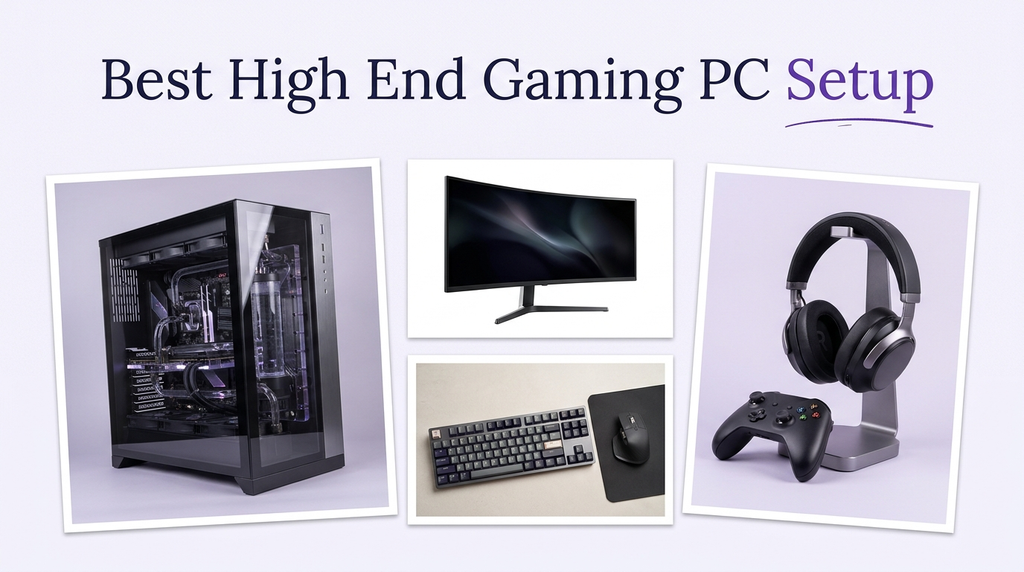
A complete high-end gaming PC setup should be ready to play without extra shopping. That usually means a capable desktop with a modern graphics card, a fast processor, enough memory, and storage for a large library, plus the peripherals and software needed to start. The best setups balance gaming performance, multitasking headroom, and the extras that make the first session easy.
Buyers often underestimate how much the rest of the setup matters. A powerful GPU needs a processor that can keep up, a cooling system that can sustain performance, and enough memory for the games and background applications. Included keyboards, mice, and Windows licenses add practical value, while connectivity for headsets, monitors, and external drives affects daily use. The right complete setup is the one that covers those basics without overspending on features you will not use.
To build this guide, we compared the listed specifications and customer ratings across all ten desktops. We weighed graphics card tier, processor, memory and storage, cooling design, power supply, connectivity, and included accessories. We also considered how each setup fits different high-end gaming priorities rather than ranking by price alone. The recommendations reflect specification-based reasoning, not measured test results.
4.2/ 5

4.7/ 5
4.2/ 5
As an Amazon Associate we earn from qualifying purchases, at no additional cost to you.
Swipe across to compare all columns
| Product | Key highlights | Rating | Explore |
|---|---|---|---|
|
Best value
KOTIN RTX 5070 Prebuilt
|
Ryzen 7 9700X CPU
RTX 5070 12GB
32GB DDR5 memory
1TB NVMe SSD
|
4.2/ 5 | Check Price |
|
Best overall
Skytech Ryzen 7 9850X3D
|
Ryzen 7 9850X3D CPU
RTX 5080 16GB
32GB DDR5 6000
2TB NVMe SSD
|
4.7/ 5 | Check Price |

Best CPU-heavy multitasking
iBUYPOWER Element Ryzen 9
|
Ryzen 9 7900X CPU
RTX 5070 12GB
32GB DDR5 memory
1TB NVMe SSD
|
4.3/ 5 | Check Price |
Best Intel high-core option
CyberPowerPC i9-14900KF
|
Core i9-14900KF CPU
RTX 5070 12GB
32GB DDR5 memory
2TB NVMe SSD
|
4.4/ 5 | Check Price |
|
Premium pick
Skytech Ryzen 7 9800X3D
|
Ryzen 7 9800X3D CPU
RTX 5070 Ti 16GB
32GB DDR5 6000
2TB NVMe SSD
|
4.2/ 5 | Check Price |

Best mid-range balance
MSI Codex Z2 RTX 5070
|
Ryzen 7 8700F CPU
RTX 5070 12GB
32GB DDR5 memory
2TB NVMe SSD
|
4.2/ 5 | Check Price |

Best value
CyberPowerPC Ryzen 7 8700F
|
Ryzen 7 8700F CPU
RTX 5060 Ti 8GB
16GB DDR5 memory
1TB NVMe SSD
|
4.3/ 5 | Check Price |

Best high-rated mid-range
RTX 3060 Ti Ryzen 5
|
Ryzen 5 5500 CPU
RTX 3060 Ti 8GB
16GB DDR4 memory
1TB PCIe SSD
|
4.8/ 5 | Check Price |

Best Intel mid-range
iBUYPOWER Element i7
|
Core i7-14700F CPU
RTX 5070 12GB
32GB DDR5 memory
1TB NVMe SSD
|
4.3/ 5 | Check Price |
Best value
Skytech Ryzen 7 7700
|
Ryzen 7 7700 CPU
RTX 5060 Ti 8GB
32GB DDR5 memory
1TB NVMe SSD
|
4.4/ 5 | Check Price |
As an Amazon Associate we earn from qualifying purchases, at no additional cost to you.
The KOTIN RTX 5070 Prebuilt is the Best value pick because it pairs the Ryzen 7 9700X with the RTX 5070 12GB, 32GB of DDR5 memory, and a 1TB NVMe SSD at a more accessible price than the flagship models. It is aimed at gamers who want a complete high-end setup for 1440p and some 4K play.
The RTX 5070 12GB handles high-resolution gaming well, and the Ryzen 7 9700X provides strong processing power for gaming and multitasking. The 32GB of DDR5 memory supports a game, browser, and voice chat at once, and the 850W 80+ Gold power supply provides headroom for future upgrades.
The 360mm AIO liquid cooler supports sustained performance, and WiFi 7 is the newest wireless standard in this comparison. The built-in 11.3-inch smart display shows temperatures and usage. The 1TB SSD is the main storage limitation for a large library.
This desktop makes sense for a buyer who wants a well-rounded high-end setup at a lower price. If you want the highest graphics performance or more storage, the RTX 5080 models and 2TB configurations are the step up.
An 850W 80+ Gold power supply provides headroom for a future graphics card or additional storage. That matters if you plan to keep the PC for several years.
Buyers who want the highest graphics performance should choose the RTX 5080 model. Anyone with a large game library should prioritize a 2TB SSD.
As an Amazon Associate we earn from qualifying purchases, at no additional cost to you.
The Skytech Ryzen 7 9850X3D is the Best overall pick because it pairs the RTX 5080 16GB with the Ryzen 7 9850X3D, 32GB of DDR5 6000 memory, and a 2TB NVMe SSD. It is the most powerful graphics configuration in this comparison and a strong complete setup for 4K gaming.
The RTX 5080 provides strong 1440p and 4K gaming performance, and the Ryzen 7 9850X3D's large cache helps frame pacing. The 32GB of memory supports multitasking, and the 2TB SSD provides generous storage. The 360mm AIO liquid cooler supports long sessions.
The case is a King 95 showcase design with a tempered-glass panel. The listed graphics outputs are one HDMI and one DisplayPort, which is enough for a single high-refresh monitor. The older WiFi 5 standard is the main connectivity limitation.
Choose this desktop if you want the strongest overall performance and generous storage. If you need the newest wireless standard, the KOTIN model offers WiFi 7.
The RTX 5080 has 16GB of GDDR7 memory and more rendering headroom than the RTX 5070 models. That matters for high-resolution gaming and future titles.
Buyers who need WiFi 7 should compare the KOTIN model. Anyone who wants a similar performance level at a lower price should consider the RTX 5070 Ti configuration.
As an Amazon Associate we earn from qualifying purchases, at no additional cost to you.
The iBUYPOWER Element pairs the twelve-core Ryzen 9 7900X with the RTX 5070 12GB, 32GB of DDR5 memory, and a 1TB NVMe SSD. It is aimed at gamers who want strong CPU performance for streaming, recording, and heavy multitasking alongside high-end gaming.
The Ryzen 9's twelve cores provide headroom for gaming, streaming, and creative work. The RTX 5070 12GB handles high-resolution gaming well. The 32GB of memory supports multitasking, and the six USB 3.1 ports provide room for peripherals.
The 1TB NVMe SSD is the main practical limitation for a large game library, and there is no USB-C port listed. The tempered-glass RGB case is a standard design.
This desktop makes sense for a buyer who values CPU headroom and wants a capable GPU. If you want the highest graphics performance or more storage, the RTX 5080 models and 2TB configurations are a better fit.
High-end gaming and multitasking benefit from a processor that can keep up with game logic and background applications. The Ryzen 9's twelve cores provide headroom for streaming and creative work.
Gamers who want the highest graphics performance should choose the RTX 5080 model. Anyone with a large game library should prioritize a 2TB SSD.
As an Amazon Associate we earn from qualifying purchases, at no additional cost to you.
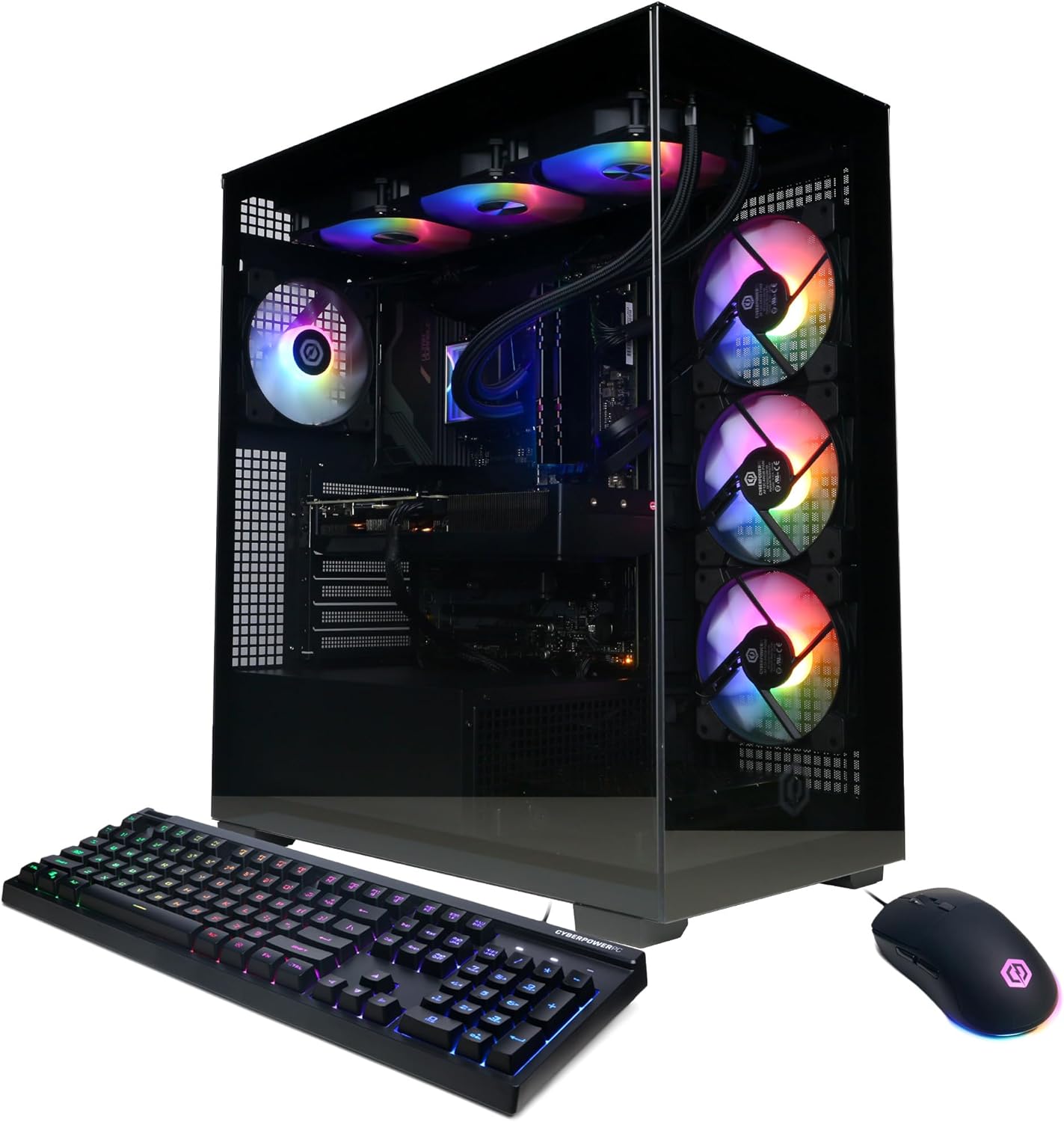
This CyberPowerPC configuration pairs the 24-core Core i9-14900KF with the RTX 5070 12GB, 32GB of DDR5 memory, and a 2TB NVMe SSD. It is aimed at gamers who want exceptional CPU performance for multitasking and creative work alongside high-end gaming.
The i9-14900KF is the most CPU-capable processor in this comparison, which matters for streaming, editing, and large game libraries. The RTX 5070 12GB handles high-resolution gaming well. The 32GB of memory and 2TB SSD provide a strong foundation.
The liquid CPU cooler helps sustain performance, and connectivity includes USB-C 3.2 and several USB-A ports. The main limitations are the older WiFi 5 and Bluetooth 4.2 standards and the large case size.
This desktop makes sense for a buyer who wants maximum CPU performance and generous storage. If you want the highest graphics performance or newer wireless standards, the RTX 5080 model is the step up.
A 24-core processor provides headroom for streaming, recording, and creative work alongside gaming. That can matter if your gaming PC doubles as a workstation.
Gamers who want the highest graphics performance should choose the RTX 5080 model. Anyone who needs newer wireless standards should plan for a wired connection.
As an Amazon Associate we earn from qualifying purchases, at no additional cost to you.
The Skytech Ryzen 7 9800X3D pairs the RTX 5070 Ti 16GB with the Ryzen 7 9800X3D, 32GB of DDR5 6000 memory, and a 2TB NVMe SSD. It is a premium option for buyers who want 16GB of video memory and generous storage.
The RTX 5070 Ti 16GB provides strong 1440p gaming performance, and the Ryzen 7 9800X3D's large cache helps frame pacing. The 32GB of memory and 2TB SSD provide a strong foundation.
The main limitations are the older WiFi 5 standard and less GPU headroom than the RTX 5080 model. The case is a King 95 showcase design with a tempered-glass panel.
Choose this desktop if you want 16GB of video memory and a 2TB SSD at a lower price than the RTX 5080. If you want the highest graphics performance, the RTX 5080 model is the step up.
A 16GB card provides more headroom at high resolutions, which can matter for future titles with larger textures. That makes this configuration a strong long-term choice.
Gamers who want the highest performance should choose an RTX 5080 model. Anyone who needs the newest wireless standard should plan for a wired connection.
As an Amazon Associate we earn from qualifying purchases, at no additional cost to you.
The MSI Codex Z2 with the Ryzen 7 8700F and RTX 5070 is a balanced mid-range desktop with an air cooler and four case fans. It is aimed at gamers who want strong 1440p performance and generous storage without the top-tier price.
The RTX 5070 12GB handles high-resolution gaming well, and the 32GB of DDR5 memory supports multitasking. The 2TB NVMe SSD provides generous storage. The air cooler and four fans are the main factors for noise and thermals.
There is no USB-C port listed, so check your accessories. The built-in RGB lighting can be controlled through MSI Center.
This desktop makes sense for a gamer who wants a well-rounded machine without paying for top-tier cooling. If quiet operation or liquid cooling is a priority, the 360mm AIO models are a better fit.
Three front intake fans and one rear exhaust fan create a steady airflow path through the case. Good airflow can let the CPU and GPU fans run slower, which helps with noise.
Buyers who want liquid cooling should choose the 360mm AIO models. Anyone who needs USB-C should verify the port layout.
As an Amazon Associate we earn from qualifying purchases, at no additional cost to you.
The CyberPowerPC Ryzen 7 8700F pairs an eight-core processor with the RTX 5060 Ti 8GB, 16GB of DDR5 memory, and a 1TB NVMe SSD. It is an affordable entry into high-end gaming, though the graphics card sits below the RTX 5070 and RTX 5080 tiers.
The Ryzen 7 8700F provides enough processing power for gaming and light multitasking, and the RTX 5060 Ti handles 1080p at high frame rates. The 16GB of memory is the main limitation for heavy multitasking, and the 8GB of video memory is modest for high settings.
Connectivity is a strong point, with WiFi 6, Bluetooth 5.3, and two USB-C 3.2 ports. The 1TB NVMe SSD provides fast load times and reasonable storage.
This desktop makes sense for a new gamer who wants a modern platform at a lower price. If you want stronger graphics or more memory, the RTX 5070 models are the step up.
Many modern accessories use USB-C. Having native USB-C ports on the desktop avoids adapters and simplifies a setup.
Gamers who want stronger performance should choose the RTX 5070 and RTX 5080 models. Anyone who runs many applications at once should prioritize 32GB of memory.
As an Amazon Associate we earn from qualifying purchases, at no additional cost to you.
This desktop pairs the RTX 3060 Ti 8GB with the Ryzen 5 5500, 16GB of DDR4 memory, and a 1TB PCIe SSD. It is a budget-focused option that still delivers strong 1080p and 1440p performance, and it carries a high customer rating.
The RTX 3060 Ti is a capable card for games at 1080p and 1440p, and it supports DLSS for additional performance. The Ryzen 5 5500 has six cores, which is enough for gaming and voice chat, though it is less capable than the higher-core processors here.
The case includes seven ARGB fans, which is a strong cooling setup for the price. Connectivity includes USB-C, three DisplayPort outputs, WiFi 6, and Bluetooth. The 1TB PCIe SSD provides reasonable storage.
This desktop makes sense for a budget-conscious gamer who plays at 1080p or 1440p. If you want a high-end graphics card for 4K, the RTX 5070 and RTX 5080 models are the right choice.
A high customer rating suggests buyers have been satisfied with this configuration. It is still worth reading individual reviews to understand the experience with the older processor and 8GB of video memory.
Gamers who want high-end performance should choose the RTX 5070 and RTX 5080 models. Anyone who runs many applications at once should prioritize 32GB of memory.
As an Amazon Associate we earn from qualifying purchases, at no additional cost to you.
The iBUYPOWER Element i7 pairs the Core i7-14700F with the RTX 5070 12GB, 32GB of DDR5 memory, and a 1TB NVMe SSD. It is aimed at gamers who want a capable Intel platform and high-end graphics.
The Core i7-14700F provides strong processing power, and the RTX 5070 12GB handles high-resolution gaming. The 32GB of memory supports multitasking, and the six USB 3.1 ports provide room for peripherals.
The 1TB NVMe SSD is the main practical limitation for a large game library, and there is no USB-C port listed. The tempered-glass RGB case is a standard design.
This desktop makes sense for a buyer who prioritizes Intel performance and a capable GPU. If you want more storage or USB-C, the KOTIN and 2TB configurations are a better fit.
An Intel platform can be a good fit if you prefer its features or already use Intel-compatible software. The Core i7-14700F provides strong performance for gaming and multitasking.
Buyers who want more storage should choose a 2TB model. Anyone who needs USB-C should verify the port layout.
As an Amazon Associate we earn from qualifying purchases, at no additional cost to you.
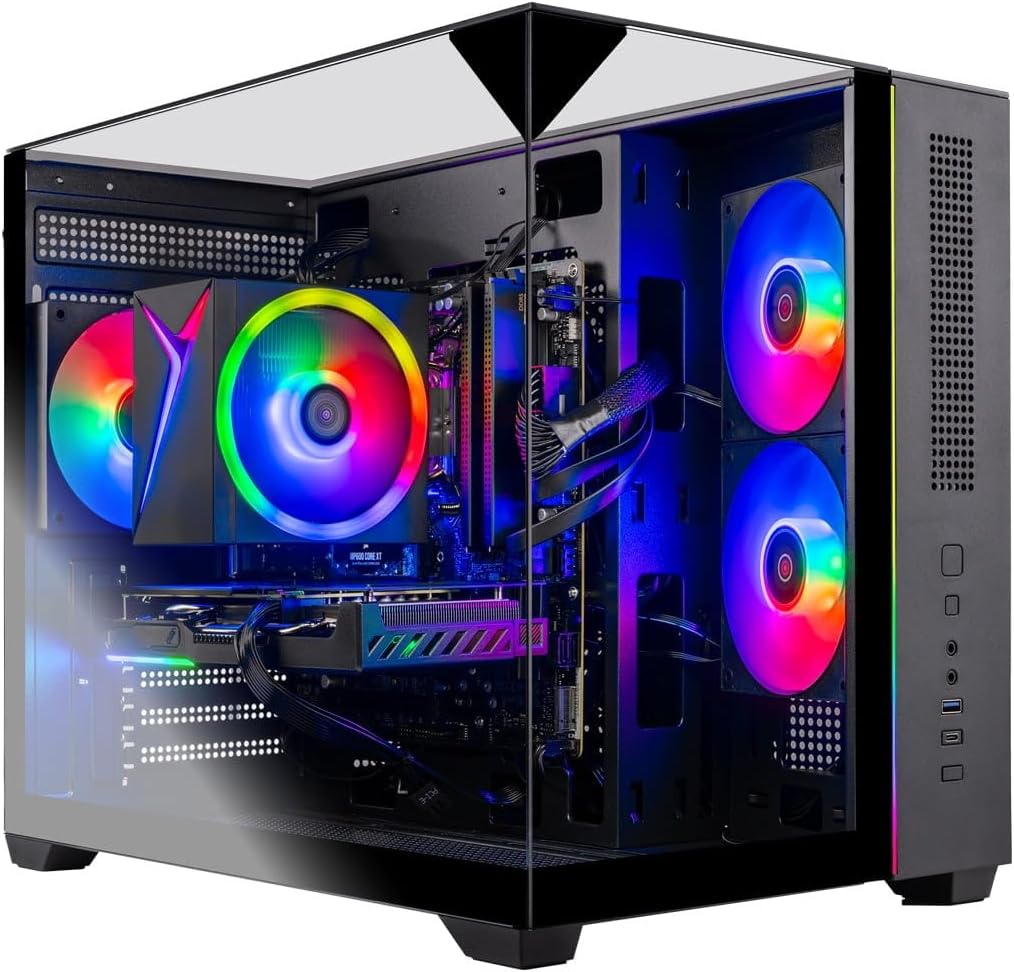
The Skytech Ryzen 7 7700 pairs a modern eight-core processor with the RTX 5060 Ti 8GB, 32GB of DDR5 memory, and a 1TB NVMe SSD. It is a balanced option for 1080p gaming with plenty of memory for multitasking.
The Ryzen 7 7700 offers strong performance for gaming, and the RTX 5060 Ti handles 1080p at high frame rates. The 32GB of DDR5 5600 memory supports multitasking, and the 1TB NVMe SSD provides fast load times. The triple tempered-glass case and air cooler are standard for the price.
The main limitation is the 8GB of video memory, which leaves less headroom for high-resolution gaming. WiFi 5 is older than WiFi 6.
This desktop makes sense for a gamer who wants a modern CPU platform and ample memory for 1080p play. If you want a high-end graphics card, the RTX 5070 and RTX 5080 models are the right choice.
A current-generation processor and DDR5 memory provide a more future-proof foundation than older platforms, which can matter if you plan to keep the desktop for several years.
Gamers who want high-end performance should choose the RTX 5070 and RTX 5080 models. Anyone who wants more VRAM should prioritize a 16GB card.
As an Amazon Associate we earn from qualifying purchases, at no additional cost to you.
A complete high-end gaming setup should cover performance, storage, cooling, and the basics you need to start playing. These factors explain what to prioritize.
The graphics card determines the resolution, frame rate, and visual settings a gaming PC can handle. In this comparison, the RTX 5080 16GB is the most powerful card, followed by the RTX 5070 Ti 16GB and RTX 5070 12GB. The RTX 5060 Ti 8GB and RTX 3060 Ti 8GB are lower tiers.
If you plan to play at 4K or with high refresh rates, prioritize the RTX 5080 or RTX 5070 Ti. For 1440p, the RTX 5070 is a strong choice. For 1080p, the RTX 5060 Ti can be sufficient.
Match the GPU to your monitor and the games you play most.
A high-end GPU needs a processor that can keep up with game logic and input. The desktops here range from six-core Ryzen 5 chips up to the 24-core Core i9-14900KF and twelve-core Ryzen 9 7900X.
If you stream or multitask, more cores help. If you mainly game, a fast eight-core processor is usually sufficient.
Balance the processor with the GPU so the system does not bottleneck.
Most high-end setups here include 32GB of DDR5 memory, which is enough for gaming and multitasking. Storage options range from 1TB to 2TB. A 2TB drive gives more freedom for large game libraries.
If you keep many games installed, prioritize 2TB. If you mainly play a few titles, 1TB is manageable.
Choose memory and storage based on your library and multitasking needs.
High-end components generate heat, and long sessions require adequate cooling. The 360mm AIO coolers on the KOTIN and Skytech models provide thermal headroom, while the MSI Codex uses air cooling with four fans.
A higher-wattage power supply provides headroom for upgrades. The KOTIN model lists an 850W 80+ Gold unit.
If you game for long sessions or plan to upgrade, prioritize strong cooling and power supply headroom.
A complete setup should include the basics. Many desktops here include a keyboard and mouse, and all include Windows. Check the listing for included accessories before buying.
If you need a monitor, headset, or desk, budget for those separately. The desktop is the core of the setup, but the peripherals affect the experience.
Confirm what is included so you know what else to buy.
Connectivity varies across these setups. Some include WiFi 7, while others use WiFi 5 or WiFi 6. The KOTIN model includes WiFi 7, and several others include WiFi 6.
For online gaming, a wired Ethernet connection is generally preferred. WiFi 7 is useful if a wired connection is not practical.
Match the connectivity to your setup and plan for a wired connection if possible.
Set up your desktop with adequate airflow, keeping clearance around the case vents. Connect your monitor to the graphics card output rather than the motherboard output, and install Windows updates and graphics drivers before playing.
Keep the cooling system clean by checking the case fans and radiator for dust every few months. Dust reduces airflow and can cause higher temperatures and louder fan noise. Use compressed air to clean the fans and vents while the system is off.
Update your graphics drivers regularly, and monitor temperatures during long sessions. Adjust fan curves in the BIOS or system software to balance temperatures and noise.
A complete setup usually includes a desktop with a modern GPU, CPU, memory, and storage, plus Windows and often a keyboard and mouse. A monitor and headset are usually separate purchases.
For 4K or high refresh rates, an RTX 5080 or RTX 5070 Ti provides strong performance. For 1440p, an RTX 5070 is a good fit. For 1080p, an RTX 5060 Ti can be sufficient.
32GB is enough for most games and multitasking. 16GB can work for gaming alone, but 32GB provides more headroom for streaming and background applications.
A 1TB SSD is a reasonable starting point, and a 2TB drive gives more freedom for large game libraries. Consider adding storage later if you choose a 1TB model.
A good air cooler can handle high-end gaming, but a 360mm AIO generally provides more thermal headroom during long sessions. If you game for hours, liquid cooling is a worthwhile consideration.
Many desktops here include a keyboard and mouse, but check the listing for your specific configuration. A monitor and headset are usually separate purchases.
WiFi 7 offers the newest wireless standard and can help with downloads and online play. A wired connection is still preferred for the most stable experience.
Many prebuilt desktops allow memory, storage, and sometimes graphics card upgrades, but it depends on the case size, power supply, and motherboard. Check the upgrade options before buying.
Check the GPU, CPU, memory, storage, cooling, power supply, and included accessories. Also confirm the monitor and peripheral requirements for your space and games.
The Skytech Ryzen 7 9850X3D is the strongest overall choice in this comparison for a complete high-end gaming setup. Its RTX 5080 16GB, Ryzen 7 9850X3D, 32GB of memory, 2TB SSD, and 360mm AIO make it well suited to 4K gaming and large libraries.
For buyers who want a lower price, the KOTIN RTX 5070 Prebuilt offers an RTX 5070, 32GB of memory, WiFi 7, and an 850W power supply. The iBUYPOWER Element Ryzen 9 and CyberPowerPC i9-14900KF provide strong CPU performance for multitasking, while the Skytech Ryzen 7 9800X3D offers 16GB of video memory and a 2TB SSD.
Your final decision should start with your monitor and the games you play. Prioritize the GPU for your resolution, choose 32GB of memory for multitasking, and select enough storage for your library. The right setup is the one that matches your space, workload, and budget without paying for capability you will not use.