

KOTIN RTX 5070 Prebuilt
4.2/ 5
Ryzen 7 9700X processor
RTX 5070 12GB graphics
32GB DDR5 memory
360mm AIO liquid cooler
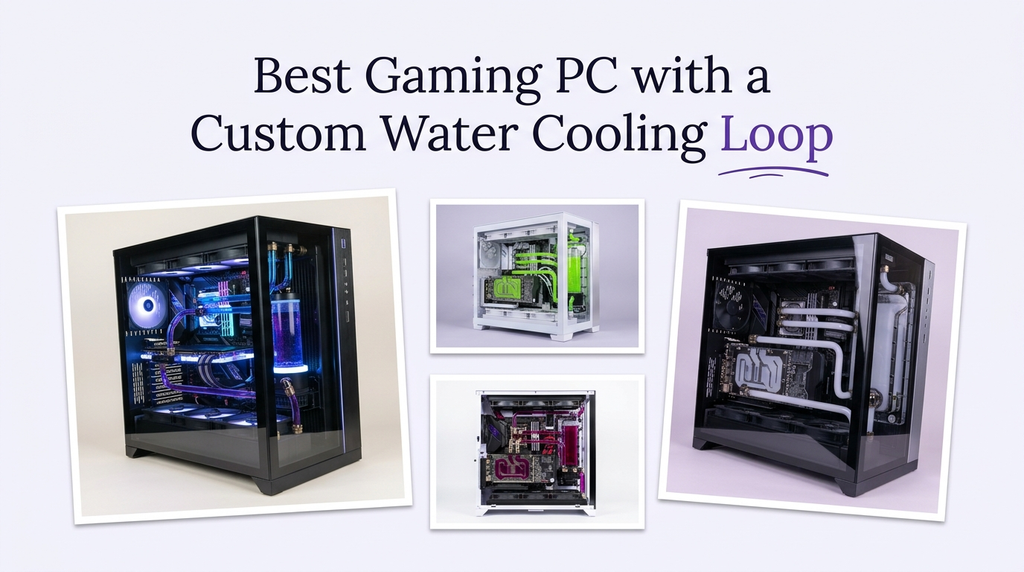
A custom water cooling loop is a project as much as a purchase. It can lower temperatures, reduce noise, and turn a gaming PC into a showcase, but it also demands planning, maintenance, and a case that can fit a pump, reservoir, radiator, and tubing. Most prebuilt gaming PCs ship with closed-loop liquid coolers rather than true custom loops, so buyers need to understand what they are actually getting.
The right approach depends on whether you want a finished machine or a build platform. Some prebuilts here include 360mm closed-loop coolers that keep the CPU cool and leave room for a custom loop later. Others pair strong components with cases and airflow that suit a custom project. A dedicated cooling kit provides the core parts, but it still needs a compatible case and a PC to install it in.
To build this guide, we compared the listed specifications and customer ratings across all ten items. We weighed graphics card tier, processor, memory and storage, cooling type and radiator size, case space, power supply, and connectivity. We also considered how each item fits a custom water cooling plan rather than ranking by price alone. The recommendations reflect specification-based reasoning, not measured test results.
4.2/ 5

4.7/ 5

As an Amazon Associate we earn from qualifying purchases, at no additional cost to you.
Swipe across to compare all columns
| Product | Key highlights | Rating | Explore |
|---|---|---|---|
|
Best build platform
KOTIN RTX 5070 Prebuilt
|
Ryzen 7 9700X CPU
RTX 5070 12GB
32GB DDR5 memory
360mm AIO cooler
|
4.2/ 5 | Check Price |
|
Premium pick
KOTIN Ryzen 7 9850X3D
|
Ryzen 7 9850X3D CPU
RTX 5080 16GB
32GB DDR5 memory
360mm AIO cooler
|
Not supplied | Check Price |
|
Best overall
Skytech Ryzen 7 9850X3D
|
Ryzen 7 9850X3D CPU
RTX 5080 16GB
32GB DDR5 6000
360mm AIO cooler
|
4.7/ 5 | Check Price |
|
Best for 16GB VRAM
Skytech Ryzen 7 9800X3D
|
Ryzen 7 9800X3D CPU
RTX 5070 Ti 16GB
32GB DDR5 6000
360mm AIO cooler
|
4.2/ 5 | Check Price |

Best for CPU-heavy workloads
iBUYPOWER Element
|
Ryzen 9 7900X CPU
RTX 5070 12GB
32GB DDR5 memory
Air CPU cooler
|
4.3/ 5 | Check Price |

Best value
i7-11700F RTX 5050 Desktop
|
Core i7-11700F CPU
RTX 5050 8GB
32GB DDR4 memory
Liquid CPU cooler
|
3.8/ 5 | Check Price |

Best 240mm liquid cooling
Thermaltake LCGS Versa
|
Ultra 7 265KF CPU
RTX 5060 Ti 8GB
32GB DDR5 6000
240mm AIO cooler
|
Not supplied | Check Price |

Best AMD graphics option
Skytech RX 9070 XT
|
Ryzen 7 9800X3D CPU
RX 9070 XT 16GB
32GB DDR5 6000
360mm AIO cooler
|
Not supplied | Check Price |

Best custom loop kit
Corsair XH505i Kit
|
XC7 CPU water block
XD6 pump reservoir
XR5 360mm radiator
iCUE LINK system hub
|
4.0/ 5 | Check Price |

Best value
Skytech Aurora RTX 5060 Ti
|
Ryzen 7 7700 CPU
RTX 5060 Ti 16GB
32GB DDR5 5600
Air CPU cooler
|
4.2/ 5 | Check Price |
As an Amazon Associate we earn from qualifying purchases, at no additional cost to you.
The KOTIN RTX 5070 Prebuilt is the Best build platform pick because it pairs the Ryzen 7 9700X with the RTX 5070 12GB in a roomy ARGB mid-tower with a 360mm AIO cooler. It is aimed at buyers who want a strong gaming PC now and plan to move to a custom water loop later.
A 360mm AIO already occupies the radiator space a custom loop would use, so the transition requires planning. The upside is that the case is large enough to accommodate a pump, reservoir, and additional radiators, and the 850W 80+ Gold power supply provides headroom for a more demanding loop. The built-in 11.3-inch smart display is useful for monitoring temperatures during a build.
The Ryzen 7 9700X and RTX 5070 provide strong 1440p gaming performance, and the 32GB of DDR5 memory supports multitasking. WiFi 7 is current, and the 1TB NVMe SSD is adequate for a starting library.
This desktop makes sense for a buyer who wants a capable gaming PC and a case with room to grow into a custom loop. If you want a custom loop out of the box, no prebuilt here includes one; the Corsair kit is the separate option for building your own.
Moving from a 360mm AIO to a custom loop means removing the AIO and installing a pump, reservoir, radiator, and tubing. Check clearances, drain points, and fill ports before buying parts, and plan a leak test before powering the system.
Buyers who want maximum graphics performance should compare the RTX 5080 models. Anyone who wants more storage should choose a 2TB configuration.
As an Amazon Associate we earn from qualifying purchases, at no additional cost to you.
The KOTIN Ryzen 7 9850X3D pairs the RTX 5080 16GB with the Ryzen 7 9850X3D, 32GB of DDR5 memory, and a 2TB PCIe 4.0 SSD in a curved-glass case with a 360mm AIO cooler. It is the Premium pick for buyers who want top-tier gaming performance and a spacious platform for a future custom loop.
The RTX 5080 provides strong 1440p and 4K gaming performance, and the Ryzen 7 9850X3D's large cache helps frame pacing. The 2TB SSD provides generous storage, and the three M.2 slots allow further expansion. The 850W 80+ Gold power supply provides headroom for a custom loop and additional components.
The case is a panoramic curved-glass design with ARGB lighting and nine fans, which offers airflow but also requires careful planning for a custom loop. The 3.95-inch IPS display can show temperatures and custom images, which is useful during a build.
The main caution is the lack of a customer rating and the fact that the AIO would need to be removed for a custom loop. If you want the strongest graphics performance and a roomy case for a future project, this is a strong choice.
A custom loop needs space for a pump, reservoir, radiator, and tubing. A spacious case with multiple fan mounts gives you more options for radiator placement and routing. Check clearances before buying parts.
Buyers who prefer a listed customer rating may favor the Skytech model. Anyone who wants a simpler case design without curved glass should check the alternatives.
As an Amazon Associate we earn from qualifying purchases, at no additional cost to you.
The Skytech Ryzen 7 9850X3D is the Best overall pick because it pairs the RTX 5080 16GB with the Ryzen 7 9850X3D, 32GB of DDR5 6000 memory, and a 2TB NVMe SSD in a King 95 case with a 360mm AIO cooler. It is a strong high-end gaming PC and a solid platform for a future custom loop.
The RTX 5080 provides strong 1440p and 4K gaming performance, and the Ryzen 7 9850X3D's large cache helps frame pacing. The 32GB of DDR5 6000 memory supports multitasking, and the 2TB SSD provides generous storage. The 360mm AIO occupies radiator space, so a custom loop would require removing it and planning new radiator placement.
Connectivity includes USB 2.0, 3.0, and 3.2 Gen1 ports. The older WiFi 5 standard is the main limitation for wireless networking. The King 95 case is a showcase design with a tempered-glass panel.
Choose this desktop if you want a high-end gaming PC with a listed customer rating and a case that can accommodate a future custom loop. If you want the newest wireless standard, the KOTIN models offer WiFi 7.
The 360mm AIO occupies a radiator mount that a custom loop could reuse, but a full loop usually adds a pump, reservoir, and additional radiator. Plan the layout before buying parts and check clearances in the case.
Buyers who need WiFi 7 should compare the KOTIN models. Anyone who wants a custom loop out of the box should note that no prebuilt here includes one.
As an Amazon Associate we earn from qualifying purchases, at no additional cost to you.
The Skytech Ryzen 7 9800X3D pairs the RTX 5070 Ti 16GB with the Ryzen 7 9800X3D, 32GB of DDR5 6000 memory, and a 2TB NVMe SSD in a King 95 case with a 360mm AIO cooler. It is aimed at gamers who want 16GB of video memory and a case with room for a future custom loop.
The RTX 5070 Ti 16GB provides strong gaming performance at 1440p, and the Ryzen 7 9800X3D's large cache helps frame pacing. The 32GB of memory and 2TB SSD provide a strong foundation. The 360mm AIO would need to be removed for a custom loop.
Connectivity includes USB 2.0, 3.0, and 3.2 Gen1 ports. The WiFi 5 standard is the main limitation. The case is a showcase design with a tempered-glass panel.
Choose this desktop if you want 16GB of video memory and a strong gaming platform for a future custom loop. If you want the highest graphics performance, the RTX 5080 models are the step up.
A 16GB graphics card provides more headroom at high resolutions, and custom water blocks for popular cards are widely available. Check block compatibility before planning a loop.
Gamers who want the highest performance should choose an RTX 5080 model. Anyone who needs the newest wireless standard should plan for a wired connection.
As an Amazon Associate we earn from qualifying purchases, at no additional cost to you.
The iBUYPOWER Element pairs the twelve-core Ryzen 9 7900X with the RTX 5070 12GB, 32GB of DDR5 memory, and a 1TB NVMe SSD. It uses an air CPU cooler rather than a liquid cooler, which makes it a different starting point for a custom loop project.
The Ryzen 9's twelve cores provide headroom for gaming and multitasking, and the RTX 5070 handles 1440p gaming well. The 32GB of memory supports multitasking, and the six USB 3.1 ports provide room for peripherals. The air cooler would be removed entirely for a custom loop, freeing space.
The 1TB NVMe SSD is the main practical limitation for a large game library. There is no USB-C port listed, which may matter for newer accessories. The tempered-glass RGB case is a standard design.
This desktop makes sense for a buyer who wants strong CPU performance and plans to build a custom loop from an air-cooled starting point. If you want a liquid cooler out of the box, the Skytech and KOTIN models are a better fit.
An air-cooled system leaves the radiator mounts free for a custom loop. That can simplify planning, though you will still need to check clearances for the pump, reservoir, and tubing.
Buyers who want a liquid cooler out of the box should choose the Skytech or KOTIN models. Anyone with a large game library should prioritize a 2TB SSD.
As an Amazon Associate we earn from qualifying purchases, at no additional cost to you.
This desktop pairs the Core i7-11700F with the RTX 5050 8GB, 32GB of DDR4 memory, and a 1TB NVMe SSD. It includes a liquid CPU cooler and nine ARGB case fans, making it a budget option for buyers who want liquid cooling and a case with airflow.
The i7-11700F is an older processor, and the RTX 5050 is an entry-level graphics card, so gaming performance is modest compared with the higher-end models here. The 32GB of memory and 1TB SSD provide reasonable multitasking and storage. The liquid CPU cooler is a closed-loop unit, not a custom loop.
The case includes nine ARGB fans, which provides strong airflow. WiFi 6 and Bluetooth 5.4 are included, along with a keyboard and mouse. The listed customer rating of 3.8 is lower than most alternatives.
This desktop makes sense for a budget buyer who wants liquid cooling and a case with many fan mounts. If you want stronger gaming performance or a true custom loop, the higher-end models and the Corsair kit are better options.
A closed-loop liquid cooler is sealed and requires no maintenance, while a custom loop uses separate components and requires filling, draining, and leak testing. This desktop includes a closed-loop cooler.
Gamers who want stronger performance should choose the RTX 5070 and RTX 5080 models. Anyone who wants a true custom loop should consider the Corsair kit.
As an Amazon Associate we earn from qualifying purchases, at no additional cost to you.
The Thermaltake LCGS Versa pairs the Core Ultra 7 265KF with the RTX 5060 Ti 8GB, 32GB of DDR5 6000 memory, and a 2TB NVMe SSD. It includes a 240mm closed-loop liquid cooler and a full-length power supply cover for a clean interior.
The Core Ultra 7 265KF provides strong processing power, and the RTX 5060 Ti handles 1080p and 1440p gaming. The 32GB of DDR5 memory and 2TB SSD provide a strong foundation. The 240mm AIO is a closed-loop unit, not a custom loop, but it leaves more case space than a 360mm radiator.
Connectivity includes USB 3.0, USB 2.0, headphone, and microphone ports, along with WiFi. The full-length PSU cover hides cables for a professional look.
This desktop makes sense for a buyer who wants a modern Intel platform, liquid cooling, and 2TB of storage. If you want a true custom loop, the Corsair kit is the separate option.
A 240mm radiator takes up less space than a 360mm unit, which can leave room for a custom loop reservoir or additional fans. It is a practical compromise for smaller cases.
Gamers who want stronger graphics performance should choose the RTX 5070 and RTX 5080 models. Buyers who want a higher-rated configuration should compare the Skytech models.
As an Amazon Associate we earn from qualifying purchases, at no additional cost to you.
The Skytech RX 9070 XT pairs the Ryzen 7 9800X3D with the AMD Radeon RX 9070 XT 16GB, 32GB of DDR5 6000 memory, and a 2TB NVMe SSD in a white King 95 3D case with a 360mm AIO cooler. It is aimed at gamers who want AMD graphics and a spacious case for a future custom loop.
The RX 9070 XT 16GB provides strong gaming performance, and the Ryzen 7 9800X3D's large cache helps frame pacing. The 32GB of memory and 2TB SSD provide a strong foundation. The 360mm AIO would need to be removed for a custom loop.
Connectivity includes USB 2.0, 3.0, and 3.2 Gen1 ports, along with WiFi 5 and Bluetooth. The white case is a showcase design with tempered glass.
This desktop makes sense for a buyer who wants AMD graphics and a white build with room for a future custom loop. If you want a listed customer rating or NVIDIA features, the Skytech RTX models are worth comparing.
Custom water blocks are available for many AMD graphics cards, but availability varies by model. Check block compatibility before planning a loop around the RX 9070 XT.
Buyers who want a listed customer rating should compare the Skytech RTX 5080 model. Anyone who wants NVIDIA features should choose an RTX configuration.
As an Amazon Associate we earn from qualifying purchases, at no additional cost to you.
The Corsair XH505i RX 360 is a complete custom cooling kit that includes an XC7 CPU water block, an XD6 pump reservoir, three RX120 RGB fans, an XR5 360mm radiator, an iCUE LINK system hub, and XT hardline tubing and fittings. It is the Best custom loop kit here because it provides the core parts for a true hardline loop in one package.
A custom loop differs from a closed-loop AIO in that the components are separate and the user assembles them. The XC7 block mounts on the CPU, the XD6 pump reservoir moves coolant, and the XR5 radiator dissipates heat. The iCUE LINK system simplifies wiring and lets you control fan and pump settings through software.
The kit does not include a case or a PC, so it must be paired with a compatible chassis and components. Hardline tubing requires careful measuring and bending, and the loop must be leak tested before powering the system. The kit is a project, not a plug-and-play upgrade.
This kit makes sense for a builder who wants a true custom loop and is prepared for the planning and maintenance involved. Buyers who want a finished gaming PC without the project should choose one of the prebuilt desktops here and accept a closed-loop cooler.
A custom loop requires assembling a CPU block, pump, reservoir, radiator, tubing, and fittings. It also requires filling, bleeding air from the loop, and leak testing before powering the system. Maintenance includes draining and refilling over time.
Buyers who want a finished gaming PC without a project should choose a prebuilt desktop. Anyone who wants a simpler liquid cooling setup should choose a closed-loop AIO model.
As an Amazon Associate we earn from qualifying purchases, at no additional cost to you.
The Skytech Aurora pairs the Ryzen 7 7700 with the RTX 5060 Ti 16GB, 32GB of DDR5 5600 memory, and a 1TB NVMe SSD in a pink Aurora case with a mesh front. It uses air cooling, which leaves radiator space free for a future custom loop.
The RTX 5060 Ti 16GB provides more video memory than the 8GB version, which helps at higher resolutions. The Ryzen 7 7700 provides strong gaming performance, and the 32GB of DDR5 memory supports multitasking. The air cooler would be removed entirely for a custom loop.
Connectivity includes USB 2.0, 3.0, and 3.2 Gen1 ports, along with WiFi 5. The mesh front and ARGB fans provide airflow.
This desktop makes sense for a buyer who wants a colorful air-cooled build and plans a custom loop later. If you want liquid cooling out of the box, the Skytech and KOTIN models are a better fit.
An air-cooled system leaves radiator mounts free, which can simplify planning for a custom loop. You will still need to check clearances for the pump, reservoir, and tubing.
Buyers who want liquid cooling out of the box should choose the Skytech or KOTIN models. Anyone who wants the newest wireless standard should plan for a wired connection.
As an Amazon Associate we earn from qualifying purchases, at no additional cost to you.
A custom water loop is a project, and the right starting point depends on whether you want a finished PC or a build platform. These factors explain what to prioritize.
Most prebuilt gaming PCs use a closed-loop AIO cooler, which is sealed and requires no maintenance. A custom loop uses separate components, including a CPU block, pump, reservoir, radiator, and tubing, and requires assembly and maintenance. The two are not the same product, and buyers should be clear about which one they want.
A closed-loop AIO is simpler and safer for most buyers. A custom loop offers more cooling capacity, quieter operation at low fan speeds, and a distinctive look, but it demands planning, leak testing, and periodic maintenance. In this comparison, the prebuilt desktops include AIO or air coolers, while the Corsair kit provides the core parts for a custom loop.
If you want a finished PC, choose a prebuilt with a strong cooler. If you want a true custom loop, choose a build platform and plan the loop separately.
A custom loop needs space for a pump, reservoir, radiator, and tubing. A large case with multiple fan mounts gives you more options for radiator placement and routing. The prebuilt desktops here use mid-tower cases, and some have 360mm AIO mounts that could be reused for a custom radiator.
Check the maximum radiator size, the clearance for a pump and reservoir, and the space for tubing bends. A case with a tempered-glass panel can show off the loop, but it also makes cable and tube routing more visible.
If you plan a custom loop, choose a case with generous interior space and multiple radiator mounts. If you want a compact build, a 240mm radiator may be a better fit.
The graphics card is often the hottest component in a gaming PC, and a custom loop can include a GPU water block for lower temperatures and quieter operation. However, water blocks are model-specific, so you need to confirm that a block exists for your exact card.
In this comparison, the RTX 5080, RTX 5070 Ti, RTX 5070, and RX 9070 XT are the main graphics options. Block availability varies by brand and model, so check before planning a loop around a specific card.
If you want to water-cool the GPU, choose a card with a known water block. If you plan to cool only the CPU, a wider range of cards is suitable.
The processor determines how much heat the loop must handle and how much performance you get. The Ryzen 7 9850X3D and 9800X3D are gaming-focused chips with large caches, while the Ryzen 9 7900X and Core Ultra 7 265KF offer more cores for multitasking.
A custom loop can handle a high-power processor more quietly than an air cooler, which is one reason builders choose it. Pair the loop with a processor that matches your workload.
If you mainly game, a gaming-focused processor is a good match. If you multitask heavily, choose a processor with more cores.
A custom loop adds a pump and fans, and a high-end graphics card draws significant power. The power supply should have enough wattage and headroom for your components. The KOTIN models list an 850W 80+ Gold power supply, which provides headroom for a loop and future upgrades.
Check the power supply wattage, certification, and cable options before planning a build. A modular power supply makes cable management easier, especially with a visible custom loop.
If you plan a custom loop with a high-end GPU, prioritize a power supply with at least 850W and an 80+ Gold rating.
A custom loop requires filling, bleeding air, and leak testing before the system is powered. Over time, coolant may need to be replaced, and the loop should be checked for leaks and buildup. This maintenance is part of owning a custom loop.
Closed-loop AIOs require no maintenance, though they can eventually fail. For most buyers, an AIO is the simpler choice. For builders who enjoy the project and the look, a custom loop is rewarding.
If you are not comfortable with maintenance and leak testing, choose a closed-loop AIO. If you are, plan the loop carefully and test it thoroughly.
Plan the loop before buying parts. Measure the case, confirm radiator and pump clearances, and check water block compatibility for your CPU and GPU. Assemble the loop outside the case where possible, and leak test with the pump running and the rest of the system unpowered.
Use distilled water with a quality coolant additive, and avoid mixing metals that can corrode. Fill the loop slowly, bleed air from the highest point, and check for leaks at every fitting. Once the loop is running, monitor temperatures and pump speed.
Maintain the loop by checking coolant levels and clarity over time, and drain and refill according to the coolant manufacturer's guidance. Keep the radiator and fans free of dust, and inspect fittings periodically for weeping or corrosion.
No. The prebuilt desktops here use closed-loop AIO or air coolers. The Corsair XH505i kit provides the core parts for a custom loop, but it must be installed in a compatible case and PC.
An AIO is a sealed, pre-filled cooler that requires no maintenance. A custom loop uses separate components, including a pump, reservoir, radiator, and tubing, and requires assembly, filling, leak testing, and periodic maintenance.
Yes, if the case has enough space and the components are compatible. You would remove the existing cooler, install the loop components, and leak test before powering the system. Check clearances and block compatibility first.
A custom loop can lower temperatures, reduce noise, and improve the look of a build. Whether it is worth it depends on your priorities. For most gamers, a good AIO is simpler and sufficient. For enthusiasts, a custom loop is a rewarding project.
A custom loop needs periodic checks for leaks and buildup, and coolant should be replaced according to the manufacturer's guidance. The exact interval depends on the coolant and usage. Plan for some maintenance over the life of the loop.
Yes, if a water block exists for your specific card model. Block availability varies by brand and model, so check compatibility before planning a loop around a GPU.
A 360mm radiator provides more cooling capacity than a 240mm unit, which can help with high-power CPUs and GPUs. A 240mm radiator may be sufficient for a CPU-only loop in a smaller case.
Run the pump with the rest of the system unpowered and use a bridging tool or jumper to power the pump alone. Place paper towels under fittings and check for leaks over several hours before powering the components.
Use distilled water with a quality coolant additive, or a premixed coolant from a reputable brand. Avoid mixing incompatible metals and follow the coolant manufacturer's guidance for maintenance.
The Skytech Ryzen 7 9850X3D with the RTX 5080 is the strongest overall choice in this comparison for a high-end gaming PC that could later host a custom loop. Its 16GB graphics card, X3D processor, 32GB of memory, 2TB SSD, and 360mm AIO make it a capable machine, and the case offers room for a future project.
For buyers who want a strong build platform, the KOTIN RTX 5070 Prebuilt offers a 360mm AIO, an 850W power supply, and WiFi 7 at a lower price. The Skytech Ryzen 7 9800X3D provides 16GB of video memory, and the iBUYPOWER Element and Skytech Aurora offer air-cooled starting points. The Corsair XH505i kit is the option for builders who want a true custom loop.
Your final decision should start with whether you want a finished PC or a project. If you want a finished machine, choose a prebuilt with a strong cooler and plan any custom loop later. If you want a true custom loop, choose a build platform and the Corsair kit, and plan carefully. The right choice is the one that matches your goals and comfort with maintenance.